Speaking at Web Directions What Do You Know evening

I’ll be speaking at the Web Directions What Do You Know evening on Thur Feb 16th on the Navigation Timing API (http://whatdoyouknow.webdirections.org/melbourne).

I am looking forward to speaking at this event as the format is a little different from what I am used to consisting of several short 5 minute presentations from 11 presenters.

The Melbourne event is sold out now (hey Navigation Timing API talks are pretty popular he he ) but there are still spaces left in Sydney, Brisbane & Perth events as of 6th Feb.


IOS5 disables cookies

Over the weekend one of my colleagues (thanks Neil!) reported that a mobile site we developed was not working properly for him although strangely was functioning fine on his girlfriends phone.

I was unable to recreate the issue on various i-devices I had so I wondered if it was some caching issue so got the user to clear his cache.

What it turned out to be however was that after upgrading to IOS 5 Safari’s cookie settings get changed to never accept cookies (sometimes!). This is obviously going to stop a lot of sites from working properly (including anything that uses session as this is maintained through a cookie).

I can’t find any official release notes/bug report detailing this but have found countless posts indicating that this occurs e.g.:

https://discussions.apple.com/thread/3385843?start=15&tstart=0

http://www.blogstorm.co.uk/ios-5-disables-cookies-breaks-loads-of-sites/

My recommendation?

You dont have a lot of choice really but to add a bit of script that attempts to set a cookie and warn the user if it cant that cookies have been disabled and provide some instructions about how to re-enable them.

ASP.net sites could look at enabling cookie-less sessions.

In IOS5 cookies can be enabled by going to Settings, Safari, Accept Cookies and change to Always.

Android device on jQueryMobile submitting form on return

We recently had an issue confined to Android users in our jQuery mobile application. When users  pressed the return button on an input field the page was submitted to the server. On every other page pressing the return button would instead correctly call the default action of the page.

The Android return button is a little strange and doesn’t have a key code associated with it. The solution was instead to interupt the form submit event:

if (navigator.userAgent.toLowerCase().indexOf(“android”) > -1) {

$(“#myForm).submit(function () {
return false;
});
}

CSS Profiler

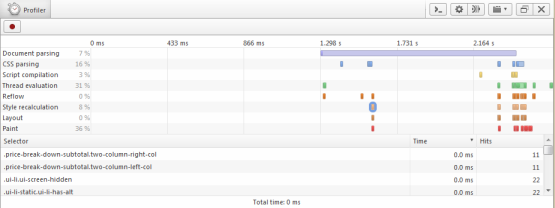
Opera has a prototype CSS profiler available that looks interesting that can shed some light on expensive selectors that you may want to optimize.

To use the profiler:

  • First make sure you have downloaded the latest version of Opera
  • Enter opera:config#developerTools in the address bar to open the configuration section
  • Amend the developer tools url to https://dragonfly.opera.com/app/stp-1/profiler/

To bring the profiler up access a page, right click select element (choose anything). Click the red record button to start the profile and refresh the page. Click the record button again to stop the trace.

Opera will then give you a break down of where time was spent rendering. If you click individual style calculation (the orange blocks or the style recalculation section you will receive a detailed breakdown).

Opera CSS Profiler

It’s early days for the profiler but looks really interesting.

Mobile Safari Crashing

We recently encountered an issue on a jQuery Mobile site where  Mobile Safari on an Ipod touch devices mobile safari would crash when accessing certain pages.

It was impossible to recreate the crashes on a desktop machine or Iphone device. Hmm what to do?

The first step is to try and get some info for what caused the crash. You can retrieve the reason for a crash on an i device by syncing it with Itunes.

On my windows machine crash reports are stored at the following location (yours will obviously differ depending on user and device name):

C:\Users\alex\AppData\Roaming\Apple Computer\Logs\CrashReporter\MobileDevice\alexs iPhone4

Crash reports for Mobile Safari have a file name similar to the following:

MobileSafari_2011-10-1-184202_alexs-iPhone4.crash

If you open up this file in notepad you may (or may just get a cryptic message) about what caused the crash.

Within this file was a report of low memory condition. We initially reviewed the pages that were crashing the ipod touch devices and found they had many DOM elements on the page (the client had asked us to replicate an existing iphone application exactly – let’s ignore whether this is a good idea for the time being..). The developer had also attached a click event to each individual element (far better to let the event bubble up the containing element). In addition to the large number of elements jQuery mobile would add its own styling/elements further compounding the problem.

The solution was to modify the event handler to capture bubbled up events and reduce the number of DOM elements. The pages then would not crash on the ipod touch device. It appears that i devices have around 10mb of memory that is shared across tabs. Due to jQuery mobile keeping pages around in the DOM you could run into this sort of issue fairly quickly so its vital to be sensible with your event binding and HTML coding. It’s also worth noting that we couldn’t get iPhone devices to crash so they probably have more memory than an iPod touch (Apple documentation is woefully inadequate regarding this..)

2012 Goals

I read a number of blog posts where individuals detailed their goals and what they were looking forward to over the coming year.

I like the idea of publicly stating your goals as believe that it can help qualify these in your own mind and make you more committed to achieving them.

I think the career highlights for me last year were:

  • Speaking at Remix and TechEd
  • Going to MVP conference – although I dont feel I learnt that much from this I enjoyed travelling to Seattle, meeting a few people and seeing the Microsoft Campus
  • Udi Dahan’s architecture course opened my mind to some new ideas
  • An interesting course on Web Accessibility from Derek Featherstone
  • Winning an internal company award for company/community contribution that enables me to go to a conference of my choice
  • Getting another book contract from Apress to write on .net 4.5 and Visual Studio 11
  • An interesting mobile site project that has just gone live

So my goals for 2012 are the following:

  • Understand WCF better – I dont like WCF as it seems way over complex but I should probably make more of an effort as its getting pretty hard to avoid..
  • Complete book Apress book on .net 4.5 Visual Studio 11 that I am currently working on (funny how you think you will never do this kind of thing again)
  • Create some sort of open source/fun project to keep skills up – enterprise development can be a little depressing at times so think it needs to be some kind of game or something.. 🙂
  • More blogging and talks – been a bit lax on this and have come across several useful tips/tricks/gotchas that I want to document
  • Run DDD Melbourne again in June/July

On a personal/non technical level I want to do the following:

  • Ensure better separation of work/personal life – I got pretty bad at this towards the end of last year and am not going down this route again!
  • Found a weight training club with a very experienced trainer – keen to advance in this area as hit a plateau through my own training – the last two sessions have completely smashed me!
  • Complete cert 4 personal trainer (cert 3 completed last year)

I am particularly looking forward to the following:

  • Visiting UK for 3 weeks
  • NDC conference

jQuery mobile experiences

Mobile optimized website projects seem to becoming increasingly common so I thought I would summarize some of the advantages & disadvantages we have experienced with using the JQM framework (jQuery mobile http://jquerymobile.com/).

But why would you use such a framework in the first place?

Well you certainly don’t have to (and in many cases probably shouldn’t) but JQM:

  • Tries to take care of various niggly display issues across multiple types of devices
  • Provides an abstraction over various events e.g. rotating a device, swipes etc
  • Takes care of history management
  • Gives you various controls similar to what exists in an iphone (because in my experience most clients seem to think a mobile site should look like an iphone app – websites are different from apps grrr – anyway moving on..)

Good things:

  • Our app on the whole displays pretty well across multiple device types with little effort e.g. iphone, ipad, various android devices & win phone 7
  • Was very quick to get up and running with JQM
  • Our brief was to copy existing iphone app and we were able to do so pretty easily
  • JQM has good documentation and examples

However we also encountered a number of issues with the framework.

Bad things:

  • JQM mobile leaves other pages in the dom (even multiple copies of the same page) which means you need to be careful with giving all selectors a context. There doesn’t seem to be a way to disable this apart from turning the ajax loading off which removes one of JQM’s biggest benefits of hijax loading
  • JQM interferes with the event model and a couple of “standard” jquery type methods such as event.preventDefault don’t work properly
  • At times JQM feels sluggish (apparently this is due to delays in place to handle taps for various device types)
  • JQM interferes with markup and adds its own styling & elements. Most of the time this is fine but we had a couple of pages that crashed ipod touch devices and iphones. This seemed to be related to number of dom elements on page
  • JQM seems to queue touch events so if you rapidly click the clicks seem to be queued up when you return to a particular page
  • Its v1 so there are a number of bugs in it

I am not sure if I would use JQM again because of some of these issues – towards the end of the project I felt we were fighting the framework. Much of the functionality e.g. transitions wouldn’t be too tricky to develop yourself. It is however excellent for small projects particularly if most of your pages are static content.

Image Optimizer extension for VS2010

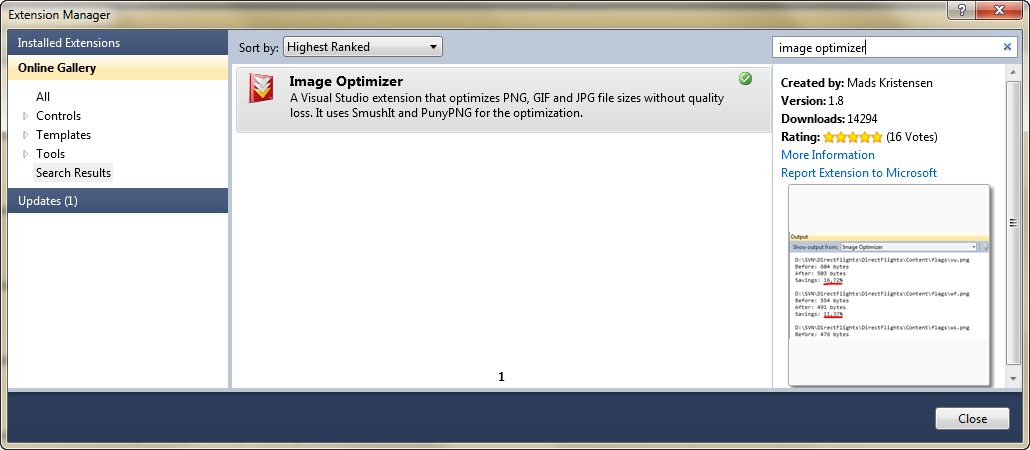
I came across a nice free extension for Visual Studio 2010 for quickly optimizing images within Visual Studio IDE. Image optimizer uses external services such as smushit and PunyPNG to reduce the file size of your images with no visible loss of quality. As this results in less downloads for your users it’s a bit of a no brainer to implement.

To install the extension open Visual Studio and go to Tools, Extension Manager, Online Gallery and search for Image Optimizer and then click Install.

Once the extension is installed you can right click on a folder and select Optimize Images to have all the images in the folder optimize (check the files are not read only/checked out otherwise you will get an exception when the add on attempts optimization.

Once Image Optimizer has finished optimizing the images it will give you a summary of how much it has reduced file size by. Below shows the output from a recent project:

14 skipped. 142 optimized. Total savings 57.27%

IE9 hardware acceleration

In addition to some dubious implementation of standards one of the main criticisms of Internet Explorer was that it lagged behind other browsers in many speed tests.

But no longer! Microsoft has invested a large amount of time in making the latest release of IE run as fast as they can.

As a consultancy we (Readify– shameless plug!) are often called in to assist with investigating and fixing poorly performing applications. A sensible approach for a performance engagement is to establish a performance base line so any improvements can be measured and then if possible break the problem down into smaller components.

The Microsoft team took a similar approach to find out where bottle necks in Internet Explorer were by analysing data from a number of (unrevealed) real world sites. Web browsers are complex beasts made up of several smaller components all of which can be tweaked.   Jason Weber (Lead Program Manager, Internet Explorer perf team) suggests that browsers generally consist of the following components:

  • Network (client/server communication)
  • Html Parsing
  • CSS Parsing
  • Collections (an odd choice for meta data processing)
  • JavaScript engine (what is says on the tin!)
  • Marshalling (browser & script engine communication)
  • Native OM (script engine & browser communication)
  • Formatting (applying of styles to document)
  • Block building (construction of blocks of text)
  • Layout (composition of page)
  • Display (displaying content to users)

The team found that the split of work changed quite dramatically between static  sites (Figure 1.1) and sites that made heavy use of ajax requests (Figure 1.2). Note I have taken these graphs from  http://blogs.msdn.com/b/ie/archive/2010/08/30/performance-profiling-how-different-web-sites-use-browser-subsystems.aspx).

Figure 1.1 – Amount of time IE 8 spends on each browser sub system on news sites.

Figure 1.2 – Amount of time IE 8 spends on each browser sub system on ajax sites.

As you can see from Figure 1.1 about a third of a time loading an ajax heavy page is spent on rendering subsystems – making this subsystem an obvious target for optimization.

So what could be done to improve this?

One change the team felt could give a big improvement was to work directly with windows display api’s at as low a level as possible and remove any unnecessary areas of abstraction. By removing unnecessary calls rendering and composition would be more efficient.

Previous versions of Internet Explorer utilized the GDI+ libraries. Internet Explorer 9 (only available on Windows Vista and Windows 7) utilizes the Direct X libraries. It is important to note that the GDI+ libraries did perform hardware acceleration to some degree but the DirectX libraries make much greater use of GPU devices.

Direct X is the name for a collection of APIs mainly concerned with multimedia & in particular graphics. You have probably come across these libraries if you have installed a game in the last 10 years or so!

Internet Explorer 9 utilizes two DirectX libraries; Direct 2D (concerned with images and shapes) and Direct Write (text) . It is important to note that both of these are built on top of Direct3D libraries. DirectX is optimized to use the GPU if available.

Microsoft divides page rendering into 3 stages all of which can benefit from hardware acceleration – different libraries are used at different stages:

  • Content Rendering (Direct 2d & Direct write)
  • Page composition (Direct 3d)
  • Desktop composition (Desktop Window Manager – part of Windows Vista/7)

In Internet Explorer 9 all of these stages can be hardware accelerated. This means that graphical calculations are performed quicker and more efficiently on the GPU. The offloading of work to the GPU also frees up resources that would normally be occupied for rendering to do other tasks.

In addition to performance benefits the DirectX libraries render text, images and animation smoother due to better handling of sub-pixels and per-primitive antialiasing (please refer to http://msdn.microsoft.com/en-us/library/dd370987(v=vs.85).aspx for more information).

But what will be accelerated?  Well it depends – it could be none, some or everything!

As a rough guide IE9 will use hardware acceleration for the following items:

  • Text
  • Vector graphics
  • Images
  • Backgrounds
  • Borders
  • Video
  • Flash (from version 10.2)

Internet Explorer 9 gives you the option to turn off hardware rendering. This option is available by going to Internet Options/Advanced and checking the Use Software Instead of GPU rendering option. This could be useful if you are experiencing rendering issues with an unsupported GPU or for  experimentation. Note if by sheer bad luck you are using a machine with unsupported device this option will be greyed out (time for a new machine!).

Microsoft initially claimed that they were the only browser to have a fully hardware accelerated pipeline. This wasn’t strictly true however as recent versions of Firefox also support this (via an abstraction they refer to as “layers” between the browser and DirectX libraries). Recent versions of Chrome also support hardware acceleration to some degree.

Dean Hachamovitch, Corporate Vice President, Internet Explorer at Microsoft stated:

“Native implementations are just better for developers, consumers, and businesses. They keep Web sites from falling behind applications in performance and other important ways. While using cross-platform, non-native compatibility layers makes browser development easier, they don’t necessarily make a better browser.” http://blogs.msdn.com/b/ie/archive/2011/04/12/native-html5-first-ie10-platform-preview-available-for-download.aspx

Robert O’Callaha from Mozilla however argues “but an extra abstraction layer need not hurt performance — if you do it right” http://weblogs.mozillazine.org/roc/archives/2010/09/
So who is right?

Well in order to look at this lets conduct a completely unscientific couple of tests on my XPS 16 laptop (ATI mobility Radeon HD4670 GPU).

I am going to use the Fish tank demo from the IE site for this (http://ie.microsoft.com/testdrive/performance/fishietank/) with 500 fish & examine the frames per second rate. This demo utilizes Canvas and Javascript to display a number of fish swimming about an aquarium and gives a rate that in can render each frame. Its difficult to test just the graphical subsystems and this “benchmark” makes heavy use of Javascript.

Below are the results from my tests:

  • IE9 hardware – 60FPS
  • IE9 Software – 5FPS
  • IE 10 preview – 4FPS
  • Chrome  11.0.696.65 – 5FPS
  • Chrome 11.0.696.65 hardware acceleration enabled * 7fps
  • Firefox 4 – 4fps
  • Safari 5.05 – crashed
  • Opera 11.10- 5fps

*Chrome has this off by default as experimental but can be enabled with about:flags option

As you can see Internet Explorer performs very well in these tests. It is also interesting to note the big differences between hardware and software acceleration performance.

Its important to note that this test was developed by Microsoft and optimized for tasks they know the browser is very good at. A number of Firefox developers commented that you would be better using WebGL for this task which isn’t yet supported by IE.

To wrap up hardware acceleration is being implemented in all major browsers. At first glance you may question how important this feature is given the vast majority of the web and its related services are text based. However as we have seen rendering subsystems play a major part in a pages load time and various demos we have seen lately show just what is achievable with the next generation of web technologies such as SVG, CSS3 and various Html 5 features.

Further reading

http://blogs.msdn.com/b/ie/archive/2010/09/10/the-architecture-of-full-hardware-acceleration-of-all-web-page-content.aspx
http://blogs.msdn.com/b/ie/archive/2010/08/30/performance-profiling-how-different-web-sites-use-browser-subsystems.aspx
http://channel9.msdn.com/Blogs/Charles/IE-9-Surfing-on-the-GPU-with-D2D
http://blogs.msdn.com/b/directx/archive/2009/09/29/comparing-direct2d-and-gdi.aspx
http://blogs.msdn.com/b/ie/archive/2011/04/01/getting-the-most-from-ie9-and-your-gpu.aspx
http://msdn.microsoft.com/en-us/library/dd370987(v=vs.85).aspx
http://en.wikipedia.org/wiki/Internet_Explorer_9
http://weblogs.mozillazine.org/roc/archives/2010/09/