Developing a WebGL Game – Part 2 (keeping JavaScript organized)

JavaScript has a tendency to get messy pretty quickly (and I’m pretty sure this isn’t just when I am writing it!).

This is due in my opinion to a number of factors:

  • People don’t understand the language and which can mean they get caught by a few traps (e.g. clobbering global scope)
  • Dev’s are unaware of some of the facilities available to them to write cleaner code (e.g. functional scope which I guess can also trip a few people up)
  • There is currently no inbuilt support for classes, modules/namespaces or script loaders. Of course there are a number of third party libraries to assist with this & some of these areas may well available in EcmaScript vNext
  • Having to cope with browser differences
  • Development & re-factoring tool’s probably aren’t quite as mature as those used in compiled languages
  • A lot of peoples JS experience is to add a pop up alert box when validation fails or to bring in a jQuery widget

In my WebGL game there is likely to be a fair amount of JavaScript so we will need to keep things organized otherwise it’s going to be as much fun working with as Sql Server Reporting Services – yes that bad my friend..

So how to organize our code?

Below is a screenshot of my current script setup (excluding external libraries).

Screenshot of scripts within game

In the beginning much of the code was in three or so files until it became obvious it needed to be pulled apart. As the game has developed I have constantly been re factoring and pulling the code out into separate files as needed and this has worked well allowing me to develop the game rapidly without getting caught up in architectural decisions.

The file Game.js contains a number of three.js specific concepts such as the game scene, camera, lighting and rendering loop.

Some of the scripts are pretty small but that’s the way I like them – much easier to maintain & anyway they will all be concatenated and bundled together before being served to the user.

Below is some code that sends a command (e.g. move creature from A to B) using SignalR proxy – it does one thing and it does it well (although er it prob should have some error handling but let’s move along):

var GameCommandSender = (function() {

"use strict";

function send(command) {

Game.eventBus.server.sendCommand(command);

}

return {

send: send

};

})();

Module pattern

This brings us to a common pattern in JavaScript for organizing code, the module pattern.

In its simplest state (and there are a number of variations each with their own advantages) the module pattern looks like this:


var myModule= (function () {

//just visible inside our function
var myPrivateValue=1;

//visible outside function

var myPublicValue=2;

function myFunction{
}

//lets export what we want people to use
return {
myFunction: myFunction,

myPublicValue: myPublicValue
}
}());

The module pattern allows us to encapsulate functionality within the myModule variable & hide variables and functions we don’t want to expose.

Strict mode

The one addition I would suggest you be sure to make in your modules is to turn on JavaScript’s strict mode by adding the following declaration to the start of your function:

“use strict”

This will help catch all sorts of things you probably didn’t want to do anyway such as accidentally creating a new variable on global scope – if you want to know more about strict mode & other EcmaScript 5 features checkout my EcmaScript 5 presentation in the downloads section of my website.

You can if you wanted turn on strict mode everywhere by declaring it in global scope but weird things might happen if you are using 3rd party libraries that don’t expect Strict Mode to be on so I would keep to declaring it inside your functions for now.

Missing classes & inheritance

With game development I have really missed having OOP constructs such as classes & inheritance easily available.

You can to simulate classes and inheritance in JavaScript but it’s slightly different to what you may be used to.

For example for any command (a message that is sent from client to the server) whether it is a move creature or attack I always want to know the type of command, which game session a player belongs to and the player making the command.

For this common functionality it makes sense to have a base command “class”:


function command(type, gameGroupName, gamePlayerId) {

this.type = type;

this.gameGroupName = gameGroupName;

this.gamePlayerId = gamePlayerId;

}

command.prototype = {

send: function() {

GameCommandSender.send({

type: this.type,

data: this.data,

gameGroupName: this.gameGroupName,

gamePlayerId: this.gamePlayerId

});

}

};

We can then inherit the command “class” using prototypical inheritance and add on functionality specific to our move command:

function moveCommand(creatureInstanceId, gameColumn, gameRow) {

this.data = {

creatureInstanceId: creatureInstanceId,

gameColumn: gameColumn,

gameRow: gameRow

};

}

moveCommand.prototype = new command('Move', gameGroupName, gamePlayerId);

moveCommand.prototype.constructor = moveCommand;

I think in the future I’ll be re-writing some of this in TypeScript. TypeScript offers a neat shorthand for classes, inheritance & interfaces and can help catch stupid errors like typos & vartiable type assignments but for now it will do.

If you want to know more about the module pattern, inheritance and many other patterns Addy Osmani has a great list of patterns and Stoyan Stefanov has a very detailed book that is a good reference.

That’s all for now 🙂

Developing a WebGL Game – Part 1

I think many will agree that you cant really know or understand a framework or library until you actually build something with it (note I don’t count WCF in this – that framework is just a pain in the ass).

Over the last few months I have been building & prototyping games with the WebGL library three.js. 

During the games development have found numerous forum posts asking how to accomplish various (simple-ish) tasks in three.js such as selecting an object with the mouse, move it from one position to another and collision detection. I can tell you how to do all this & have come across a few tips and tricks that I thought others might find useful so have decided to blog about the games development. 

In this first post I will be covering the background to my game so if you are after technical details come back next time..

Beginning three.js

One of my earliest WebGL experiments involved creating a simple car game & integrating the physics engine Physijs. 

It looked like this:

car

Yeah Forza probably isn’t in any danger..

In this example you can use the cop car to ram the green column (don’t do this – the police would be very upset) which then topples over depending on the speed it is hit at.

Integrating the physics library was surprisingly easy and it took care of much of the complexity albeit with the caveat that the occasional odd thing would happen and the vehicle would take off spiraling off into space.

One of the interesting things creating this little example gave me was an appreciation of the subtleties that go into game development. Making a game feel right is surprisingly hard. E.g with a car game you don’t want to feel if the car is floating above the surface & you want to make the acceleration feel like you are shifting up through gears etc etc.

Anyway I tired of this and started a new project to create a new game, and preferably one that I would actually finish developing.

Developing a game also seemed to be a good excuse to play with some technologies that don’t generally come up in paid employment that I wanted to work with such as:

  • WebGL & shaders
  • Advanced JS constructs
  • Possibly Angular for the UI of the game although I remain undecided on this
  • Something to keep game sessions in sync (currently SignalR)
  • Web workers
  • Audio API

What type of game to create?

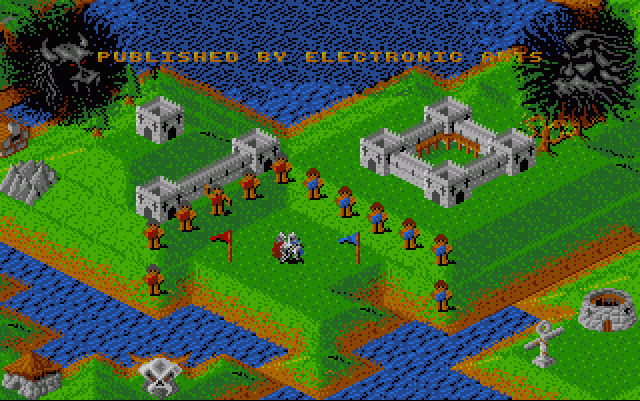
During my childhood my favorite games were “god” or turn based strategy games (hmm not sure what that says about me) and two of my favorite were a game called Populous and another Lords of Chaos.

Below is a screenshot of Populous:

Populous-2(

(http://www.dazeland.com/images/Amiga/Populous-2.png)

In populous you are a god in charge of the blue tribe who has the aim of destroying the red tribe (not sure why they hatted the red guys). This was accomplished through flattening the terrain which led to your tribe being able to build better villages & casting spells to destroy your opponent & their tribe.

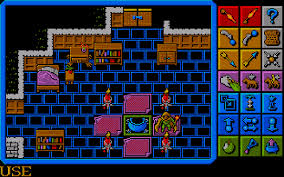
The other game I enjoyed was Lords of Chaos. The basic premise is simple – you have to destroy the other wizard/player. Each turn you have a certain number of action points you can spend to walk around the randomly generated environment & cast spells and then your turn is over.

loc

(http://eager.back2roots.org/SSHOT/L/lordschaos.png)

So I decided I wanted to build a game with aspects of both Populous & Lords of Chaos although it is developing into something else as I go along.

If you have stayed with me this far you are probably wondering what my game looks like at the moment.

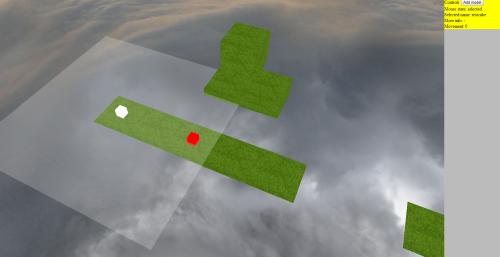
Well er its not the prettiest thing:

gameSoFar

Yeah it doesn’t look like too much but there is actually a lot of functionality here that has taken months to develop.

One of the things I did was prototype the tricky areas of functionality before putting anything together. For example in a turn based strategy game I am pretty sure that I will need to select stuff, move it around and detect when objects collide.

In the game you can do the following so far:

  • Move stuff around the environment
  • Generate maps from terrain files (well a terrain file consists of 2 arrays storing tile type, height)
  • Objects can only move a configurable distance
  • When selecting an object it shows the range they can move to (that’s the light grey highlight square in the pic above)
  • The white cube can attack the red cube – but only when its adjacent to it
  • Syncing of environment between sessions – e.g. so 2 people can play the game on different machines
  • The ability to move the viewport around in all directions

Next up I will be discussing project organization – JavaScript can get unmanageable pretty quick unless you are careful..

DDD Mebourne coordinator Lars Klint releases Windows Phone Pluralsight Course!

My friend and fellow DDDMelbourne coordinator Lars Klint recently released his Windows Phone Pluralsight course – Building Windows Phone Apps That Stand Out.

I don’t think there are many people that are bigger Windows Phone fans than Lars and its great to see him sharing his knowledge. 

Congratulations Lars and I know how much work goes into putting together training content.

Windows Phone developers be sure to check it out!

Whats new in IE11?

With the Windows 8.1 update in addition to a whole heap of OS changes and the reappearance of the start button (well kind of) we get the latest version of Internet Explorer – Internet Explorer 11!

Internet Explorer 11 of course contains improved support for new standards and API’s and it’s great to see Microsoft really stepped up their release cadence with IE 10 released only a year ago – can you believe there was about 3 years between IE 8 & 9 being released and 5 whole years between IE 5 & 6!

IE11 contains a heap of new features but for those of you with a short attention span my top 5 are:

  • A long overdue refresh of the F12 developer tools bringing IE11’s dev tooling into line with other browsers and with the addition of a few treats not found elsewhere
  • Support for a number of new standards & APIs  – e.g. dataset, mutation observers
  • WebGL meaning from now on every major browser supports a way to render 3d content!
  • Tab, history & setting synchronization
  • Page asset/network prioritization changes

IE 11 supported platforms
IE11 is of course supported on Windows 8 as part of the Windows 8.1 update but if you are running Windows 7 sp1 (and who can blame you as Win 8 has some er irritating quirks) you will still be able to use IE11 (although it’s not yet released at the time of writing so you er can’t quite yet).

It’s also worth noting there are some features that are not supported in Windows 7 due to OS limitations around graphics, security & device orientation. For a full list please refer to:  http://msdn.microsoft.com/en-US/library/ie/dn394063(v=vs.85)#unsupported_features

IE 11 will also be supported on Windows Server 2008 R2 Sp1 & will come with Windows Server 2012 R2.

Completely overhauled F12 developer tools
The new F12 developer tools deserve an entire blog post(s) of their own so I will just summarize some of the main changes (you can go to http://msdn.microsoft.com/en-us/library/ie/bg182326(v=vs.85).aspx to read in more detail about these):

  • New improved cleaner, more intuitive interface
  • Ability to right click to inspect an element
  • Intellisense auto completion for html, css & js
  • DOM drag & drop
  • No need to refresh page to enable debugging
  • Scrollbar shows breakpoints in code
  • See event handlers applied to node (and ill add that I found this better referenced the code than Chromes implementation)
  • Ability to move execution point backwards
  • Break on creation of new web worker
  • Performance profiling
  • Screen (size & resolution) & GPS emulation (for geolocation testing)
  • Ability to identify detached DOM nodes that can cause memory headaches

The below screenshot shows the new tools so you can see how different they are:

devTools

Synchronization
As long as you are using a Microsoft account (e.g. not just a local Windows account) then IE 11 will sync your browser history, typed URLs, favourites,  settings and credentials using Skydrive behind the scenes. The settings for this feature are a little hidden away under PC Settings, Skydrive, sync settings and enables fine tuning of just what’s synced.

Whilst we are discussing tabs IE 11 allows you to open unlimited numbers of tabs (you were limited to 10 in IE10) so you can have all your cat pictures open at once.

Standards & compatibility related changes
When IE 8 was released Microsoft introduced the concept of document modes to facilitate the rendering of older web pages. It is possible using a special http header or meta tag to tell IE to render a page using a particular document mode version. This feature would sometimes be useful when working with sites or CMS systems where you had little control over the html that was rendered and needed to ensure it worked with a particular browser version.

From IE 11 to help move things forward & provide the best user experience possible document mode should be considered deprecated (although will still currently work as of IE11). In IE11 edge mode is the preferred mode to render documents and contains the support for the standards. It’s very easy to tell IE11 that you want your page to be rendered using this mode simply add the html 5 doctype,

In the olden days some sites would use API’s such as navigator.appName & navigator.product to detect whether IE was accessing a page and serve a more basic version of a site (as older versions of IE had poorer standards support). The problem with this is that later versions of IE probably do support these features which can result in a poor experience  for users. IE 11 will now return “Netscape” when navigator.appName is called and “Gecko” for navigator.product. This also reflects whats specified in the HTML5 standard and what other browsers do so don’t think this is some Microsoft related hackary!

IE 11 removes support for a number of legacy api’s that you really shouldn’t be using anyway such as attachEvent, execScript & the most evil document.all. For a full list please refer to: http://msdn.microsoft.com/en-us/library/ie/bg182625(v=vs.85).aspx

Change to user agent string
On Windows 8.1 IE 11 will identify itself as:

Mozilla/5.0 (Windows NT 6.3; Trident/7.0; rv:11.0) like Gecko

Microsoft say they changed the user agent string to reduce the possibility of IE being incorrectly identified as an earlier version e.g. IE 10 identified itself as:

Mozilla/5.0 (compatible; MSIE 10.0; Windows NT 6.1; Trident/6.0)

So I guess “compatible” & “MSIE” potentially caused some issues. MS say that if for some strange reason you want to detect just IE 11 (and you probably don’t really want to do this as you should be using feature detection)  then you can check for the presence of the string “Trident” (IE’s layout engine) and presumably should also use the version number once when IE12 is released.

API & JS Feature Support
IE now supports the following features & APIs:

  • Dataset for reading custom data attributes from an element
  • Mutation observers (a way of monitoring DOM changes e.g. changes to values or the addition & removal of nodes)
  • let (blockscoped variable)
  • const (block scoped constant variable)
  • Set’s (Set’s ensure uniqueness of key, value pairs in a collection)
  • Maps (work a bit like a C# dictionary)
  • WeakMap – like a Map object but the key must be an object. If the key object is destroyed the weak map removes the key/value pair automatically
  • Internationalization API (date & number formatting stuff)
  • __proto__ property
  • Better canvas support
  • Fullscreen API
  • Screen Orientation API
  • Device orientation events
  • Web Cryptography API
  • Clipboard support for images pasted into contenteditable regions
  • Input Method Editor (IME) accessibility support  – I’m not too clear what this is but apparently as an example enables you to “avoid user interface collisions” http://msdn.microsoft.com/en-us/library/ie/dn385696
  • Accessibility support for clear button in text input
  • Command identifiers – allow control over undo stack for editing

Graphical & Layout related changes
IE 11 has the following graphical & layout related changes:

  • WebGL (yay! – it’s worth noting that Microsoft classify IE11’s WebGL implementation as an “early preview” so not all the APIs are fully supported yet. There is full a list of what’s working at: http://msdn.microsoft.com/en-us/library/ie/bg182648(v=vs.85).aspx)
  • New devicePixelRatio property (devicePixelRatio is the ratio between device pixels & dpi adjusted css pixels)
  • Better support for scaling & zooming
  • Support for different DPI’s on different monitors (previously one DPI was supported)
  • Updated flexbox support
  • CSS3 Border-images
  • Support for SVG pointer events
  • Fix for a number of bugs in East Asian & bi directional text

Performance
IE 11 has improved performance with the SunSpider bench mark in July 2013 showing IE 11 is faster than Chrome 28, Firefox 22 & Opera 15 in the testing of some er fairly specific JavaScript scenarios. Of course in the real world browser performance is affected by a number of factors such as rendering, network requests and a number of other things so its tricky to say which is the quickest browser currently. The takeaway is that IE’s JS engine is very fast and at the least comparable with competitors offerings.

Other performance enhancements in IE 11 include:

  • Caching of pages already loaded as long as they meet certain conditions (e.g. must be served over http, contain no websocket usage or pending IndexDb transactions, ActiveX controls etc)
  • Page assets prioritized (layout stuff first all the way to audio, video & ActiveX components)
  • Prioritization by context (e.g. pages in background tabs have lower preference than one in the foreground)
  • Support for lazyload attribute to delay individual resources e.g. <img src=”unimportant.png” lazyload=”1” /> (0 indicates should be loaded with default priority)
  • Preload attribute support (tells the browser to render a page in the background )
  • Prefetch support (tell the browser to download something into the cache – can do up to 10 times per page)
  • Dns-prefetch – tells the browser to resolve a dns query in the background

It’s worth noting that using prerendered & prefetch could have some side effects with scripts & animations already having been run on page – you have been warned!

Security
Microsoft quote that an independent study by NSS lab also showed that IE11 blocked 99.96% of malware based on a 754 examples of malicious software which was better than other browsers that were tested which is awesome news. In previous NSS tests other browsers performed better in some other areas e.g. preventing phishing attacks (http://www.infosecurity-magazine.com/view/33645/there-is-no-single-most-secure-browser/) so read into this you will.

It’s quite clear however that Microsoft take security very seriously and IE 11 offers further features to increase protection:

  • In IE11 on Windows 8 Enhanced protection mode (EPM) & App container are turned on by default. This prevents unauthorized reading/writing to OS and was previously off by default
  • The ability to create Do Not Track (DNT) exceptions (DNT is a header to indicate that a site shouldn’t track a user)
  • Support for a number of new group policy settings e.g. control of page prediction, ms personalization of search results, phone number, SPDY/3 network protocol
  • Ability to block all 3rd party cookies (found under settings, privacy, cookies)

Windows 8 app related changes
I don’t have a Microsoft tablet related device so I can’t test some of these but apparently IE 11 supports:

  • Phone number detection (not desktop mode)
  • Ability to show 2 windows side by side
  • Browser will scale to fix content
  • Access to downloaded file list
  • Tab position improved
  • Hover states mapped to tap & hold
  • Drag & drop via touch
  • Live tiles with Pinned sites
  • Backswipe with smarter caching
  • Gyroscope input

Misc changes
Some other changes didn’t really fit in other sections but deserve a mention:

  • Mpeg dash support (high quality streaming of media content over http)
  • Better video captioning support for HTML 5 videos – support for dynamic TextTrack (add captions to HTML5 videos using JS,
  • SDP (simple delivery profile) captioning support
  • Ability to control whether video data fetched using XHR is written to disk or not
  • SPDY/3 support (a protocol that modifies the way HTTP is sent to be more efficient)
  • IE 11 will encode all url’s using UTF-8
  • IE 11 includes Adobe Flash out the box!

Potential issues
Of course every new release of software brings with it potential issues and IE is no exception. There has already been an issue with the rendering of Google’s search results that is now fixed but I think the following could potentially cause some headaches:

Summary
I really feel this release of Internet Explorer competes with offerings from competitors and will win some developers back with it’s much improved F12 developer tools. It’s also great to see support for the newer web technologies such as WebGL and Microsoft contributing to the community by proposing new standards such as IME.

It is frustrating to see that IE is often one step behind competitors offerings due to its slower release cycle. If anything I think this is due to Internet Explorer’s tight integration with Windows which only seems to be increasing with Windows 8 apps relying on IE components 😦

I really don’t think it a good idea that a browser is tied to an operating system so closely (although this has its advantages as well) and it will be interesting to see the direction the Internet Explorer team take with this in the future. I found Aaron Powell’s suggestion that Microsoft fork IE to test new features that get fed back into the main Internet Explorer an interesting read.

My only real gripe with IE now is that I would really like to see a good way to extend the browser – this is currently far too hard & badly documented.

But in conclusion IE 11 is a great release and a massive improvement on IE 10 with its improved development tooling.

Further reading

IE 11 guide for developers http://msdn.microsoft.com/en-us/library/ie/bg182636(v=vs.85).aspx

IE Blog http://blogs.msdn.com/b/ie/

Overview of IE 11 http://technet.microsoft.com/en-us/ie/dn269977.aspx

IE test drive site http://ie.microsoft.com/testdrive/

WEBGL AND THREE.JS INTRO PART 2

This is a series of tutorials on WebGL using the three.js library – you may also be interested in Part 1 

In my previous post we discussed the history of WebGL and looked at a number of libraries to make working with WebGL as easy as possible.

We will be working with the three.js library so the first thing you will want to do is head over to http://threejs.org/ and download the latest version of three.js.

There is a little download link on the left hand side of the page you want to click on to which will give you a zip file containing the latest three.js library and a heap of examples.

Let me start by saying that Three.js is an awesome project, it has a team of very active developers, a big community and some great examples – there is a big but coming however..

Image

Three.js’s documentation sucks. Really sucks – in fact it sucks more than White house down which is the worst movie I have seen this year. I’d love to help the three.js guys fix up the documentation but just don’t have enough knowledge to assist in this area yet so will just whinge (and warn you) about it right now..

It is worth mentioning that three.js does have an enormous number of examples available which is arguably better than documentation anyway. However I found that its not that obvious how some of them work as there is little in the way of explanation of some of the maths involved. This coupled with bad documentation can make for a frustrating process of trial and error to work out how to use the various features. I found a collection of some more readable examples at http://stemkoski.github.io/Three.js that you may want to check out.

So before we get any further I want to save you a lot of time & effort & recommend a book to you – Chris Storm’s 3D programming for kids.

Don’t worry I wont tell anyone you downloaded a programming book aimed at kids (I do have my doubts how many 10 year old’s will cope with matrix projections but I digress..).

Don’t let the title put you off – this is by far the best introduction I have read of three.js and contains a number of very useful examples that will save you heaps of time working out how to do common tasks such as animating a group of objects, move a character around & collision detection. This book also has a very readable explanation of some of the maths involved in 3D programming – its also apparently used as a university text in an introduction to 3D programming course so don’t feel too bad..

In our first example we will draw a wire frame sphere on the screen.

Why? – well why not and we’re not going to be coding GTA V in our first example.

The end product will look like this:

Image

Start off by creating a new html page – note you don’t need jQuery but it will save some typing later on:

<!DOCTYPE html>
<html>
<head>
<title>Hello three.js</title>
</head>
<body>

<script src="three.js"></script>
<script src="jquery-2.0.2.js"></script>
<script src="helloExample.js"></script>

</body>

</html>

Now create a JavaScript file called helloExample.js and add the following code:

(function() {

"use strict";

var camera,
scene = new THREE.Scene(),
renderer = new THREE.WebGLRenderer(),
aspect = window.innerWidth / window.innerHeight,
container,
light,
sphere,
sphereMaterial;
camera = new THREE.PerspectiveCamera(75, aspect, 1, 1000);

camera.position.z = 300;
scene.add(camera);

light = new THREE.PointLight(0xFFFFFF, 1);
light.position.set(0, 0, 200);
scene.add(light);

sphereMaterial = new THREE.MeshBasicMaterial({
color: 0x000000,
wireframe: true,
wireframeLinewidth: 2

});

sphere = new THREE.Mesh(new THREE.SphereGeometry(100, 16, 16), sphereMaterial);
scene.add(sphere);

container = document.createElement('div');
container.id = "container";
document.body.appendChild(container);
container.appendChild(renderer.domElement);

renderer.setSize(window.innerWidth, window.innerHeight);
renderer.render(scene, camera);

})();

So what’s going on here?

Well before we run through the code let’s recap on how coordinates work. We will need a way of telling three.js where we want objects on the screen.

Three.js’s coordinate system looks like this:

coordinates

So there are 3 axis’s that allow you to position objects on the scene. Three.js also contains some scale methods to make working with different size objects easy that we will use later on.

I think this is fairly straight forward & familiar to most programmers but dont worry this will quickly become complex later on when we want to point the camera at a specific object for example 🙂

OK now we have this foundation stuff out the way let’s look at the code.

First up we create and initialize a number of objects we will make use of later:

var camera,
scene = new THREE.Scene(),
renderer = new THREE.WebGLRenderer(),
aspect = window.innerWidth / window.innerHeight,
container,
light,
sphere,
sphereMaterial;

We then create a new PerspectiveCamera (there is also another type of camera called OrphographicCamera which doesn’t render perspective but don’t worry about that for now) that tells three.js where we are looking at:

camera = new THREE.PerspectiveCamera(75, aspect, 1, 1000);

The first parameter (75) refers to the vertical field of view of the camera (FOV), the second represents the aspect ratio of the screen and the 3rd and 4th parameter tell three.js we want to see objects between 1 and 1000 z position – this can be important for performance (why render stuff really far away?) and certain effects. Hmm wtf does all that mean? Well Jeff Atwood (coding horror) has a good diagram & explanation of FOV & aspect ratios that you should check out.

Next up we move our camera nearer to us (e.g. back) by changing the z position. We then add it to our scene:

camera.position.z = 300;
scene.add(camera);

It’s important with three.js to remember to add a light to a scene otherwise we won’t see anything so lets do that:

light = new THREE.PointLight(0xFFFFFF, 1);
light.position.set(0, 0, 200);
scene.add(light);

There are a number of other types of lights and you can also play with the colors to create some great effects.

Next up we create a material (kind of what we will paint our object with).

In this example we will indicate that we  want a wire frame version of the object as we are hipster like that:

sphereMaterial = new THREE.MeshBasicMaterial({
color: 0x000000,
wireframe: true,
wireframeLinewidth: 2
});

Now up lets create our sphere by creating a mesh (think of meshes as a scaffold for the object based on a collection of x,y & z points – called Vertices in 3D speak) based on one of three.js’s primitives – SphereGeometry:

sphere = new THREE.Mesh(new THREE.SphereGeometry(100, 16, 16), sphereMaterial);
scene.add(sphere);

The 100 specifies the size of the object and the 16’s how many parts or segments make up the sphere – more parts = smoother sphere but potentially more memory to store object & slower to render.

Finally we need a way of getting this onto the page itself so lets create a div & append our renderer we created earlier to it:

container = document.createElement('div');
container.id = "container";
document.body.appendChild(container);
container.appendChild(renderer.domElement);
renderer.setSize(window.innerWidth, window.innerHeight);

This will all get rendered in a canvas element that three.js will create for us inside the container div.

Finally we need to tell three.js we want to render our content:

renderer.render(scene, camera);

And we are done!

Although there is a fair bit of code most of its around setup and you will need something similar each time so you will quickly get used to it.

Next time we will look at animation!

Kiandra Hackathon 2

Last night was the 2nd Kiandra hackathon & attended by most our software team including BA’s, PM’s and QA’s.

Our hackathons are fun competitive events (with prizes!) and also give everyone a chance to work on a challenging problem that’s probably different to the type of work they would do normally & with people they might not normally work with.

Prior to each hackathon we have been agreeing upon a theme to give direction & get people working in an area they might not normally.  Once we have a theme we create a user voice site where people can put up ideas for projects which are then voted on. People can then choose the teams they want to work on with the ideas that interest them.

At the start of each hackathon each participant gets a hackathon pack containing snacks, caffeine & a few silly items that help create a fun atmosphere.

The first hackathon’s theme was touch and gesture. My team worked with the Kinnect api’s to produce an interactive story wall kinda like Minority report – well that was the idea anyway..

Last night’s theme was big data/mashup’s and we had a number of different projects:

  • “What is the most manly movie?”  (some random title no one had ever heard of apparently!)
  • A movie recommendation engine “Netflox” (sorry Cal but the film “free willy” should never be recommended to anyone)
  • An analysis of traffic data
  • A dashboard showing company information
  • A look at the stock market & correlation between stocks rising & falling

These projects had varying degrees of success!

I worked on the traffic data team. Although some of our team members had set up Hadoop prior to the hackathon we decided that as no one on the team had used it before & we only had 4-5 hours our time was better invested concentrating on the actual problem rather than wrestling with Hadoop. We thus decided to import the data into something we were familiar with – SQL server.

In hindsight we should have given this more thought as the dataset was very large (hundreds of gigs) and it took forever to import. We should have setup indexes prior to import as they took forever to create afterwards and without them querying was far too slow.

Luckily some of the other members of our team were more successful in their tasks and managed to divide up the data into grid squares and show visualization based on fake data.

One of the things the hackathon really hammered home to me was all the cool stuff that can & will be done with large amounts of data and parallel/grid computation.  A science fiction book I read recently discussed how a city’s traffic system was kept flowing by a super computer monitoring traffic flow – it doesn’t seem so farfetched & we are starting to see some of this type of thing already e.g. see Audi’s traffic light detection system.

I look forward to Kiandra hackathon 3!

WebGL and Three.js intro part 1

The last few months I have been playing with a technology called WebGL.

There have been a number of somewhat unsuccessful attempts to get 3D on the web which didn’t really seem to go anywhere. WebGL seems to be gaining some traction probably due to improved bandwidth & browser performance and a JavaScript renaissance.

WebGL came out of experiments a clever guy called Vladimir Vukićević was doing with canvas at Mozilla and is based on a cut down version of the OpenGL specification called OpenGL ES 2.0.

WebGL certainly isn’t the easiest technology to pick up – in fact learning WebGL can feel a bit like this:

Picture1

Image from: http://www.travsite.com/images/16.jpg

So you want to learn WebGL?

Well prepare to waste many hours & nights scratching your head about why you can no longer get a simple cube to appear on the screen that was working perfectly yesterday.

You have been warned – and as a spoiler more often than not any problems are due to you having done something dumb 🙂

Unsurprisingly in addition to learning the WebGL api’s and libraries with 3D there is going to be a bit of maths involved if you want to do anything interesting. If like me you haven’t really studied Maths for the last 17 years you probably have forgotten most of it – thus you’ll be needing to refresh your knowledge of what things like a radian is and maybe a little bit of trig.

But now I have failed to deter you why should you care about WebGL at all?

Well the main reasons I can think of are

  • You can perform tasks not possible (or very difficult with other technologies such as Canvas, SVG etc)
  • WebGL is integrated with the DOM opening up some interesting possibilities & allows you to use technologies & languages you are familiar with
  • It’s a very open standard maintained by the Khronos group
  • It’s helping drive other browser particularly performance advances
  • WebGL is supported in all the latest browsers including IE 11 preview*
  • There’s coming mobile support (blackberry, opera, FF) & apparently WebGL is also already in iOS but has restricted usage right now
  • It’s fun and a bit different to sticking data in a database 🙂

*note many of the existing demos on sites such as three.js wont work on IE11 preview right now but expect this to change

For me the main use cases for the technology are:

  • Data visualization – check out http://workshop.chromeexperiments.com/projects/armsglobe/
  • Games!
  • Interactive page components e.g. allowing a user to visualize your products by rotating it around
  • Modelling/simulation
  • Integration with other technologies e.g. geo api’s, big data etc

But there are also a few reasons why you want to avoid WebGL

  • It’s bloody hard work – many of the type of issues you will encounter wont result in an error – you just wont see what you expect. More than likely you have done something dumb like place an object behind you or forget to add a light but it can make for a very frustrating development experience
  • Browser support varies somewhat – it’s probably safest right now to play with WebGL in Chrome
  • Libraries are in a state of flux & many have bad documentation which makes it pretty tricky to get stuck in. During 3 months of research and development everytime I upgraded the three.js libaries it broke all my demos as method names etc had changed
  • Security concerns – WebGL is running code directly on your graphics card and OpenGL was built for speed rather than security. I suspect we will see some security issues over the coming years with WebGL and there has already been a demonstration of reading pixel data from another site. There is a great stack overflow post discussing this more. In fact you might want to consider turning WebGL off for all but trusted sites.

What’s pure WebGL code look like?

The below example  that I stole from somewhere (sorry forgotten where) draws a blue rectangle:

<!DOCTYPE html>

<html>

<canvas id=’c’></canvas>

<script>

var c = document.getElementById(‘c’);

var gl = c.getContext(‘webgl’);

gl.clearColor(0,0,0.8,1);

gl.clear(gl.COLOR_BUFFER_BIT);

</script>

</html>

Hmm not too bad but things get complicated quickly. Check out an example written using raw WebGL and using a library:

Life’s too short so I’d strongly suggest you avoid working with WebGL directly and use one of the many libraries available:

Three.js seems to be the dominant one right now so that’s the one I will be using in my coming posts.

Next time – getting started with Three.js and useful resources!

DDD Melbourne 4 – voting now open!

I am pleased to announce that DDD Melbourne 4 voting is now open so head over to www.dddmelbourne.com and let us know which sessions you want to see!

This will be the 4th year we have held DDD Melbourne. The conference has grown quickly with just under 250 delegates attending last year and we expect to have even more this year with the addition of an extra track. I found it interesting this year that we had sponsors coming to us rather than us chasing various companies for support which was a good sign that our reach was expanding.

Although I am biased I think we now have one of (if not the) best development conferences in Australia – especially for the tiny sum of $25 which includes catering throughout the day!

This year we had 48 session submissions in a wide range of subjects offering great choice for attendees – I am excited to see which sessions get selected once the voting results are in next week.

We have made a few changes to the format this year:

  • New keynote – Joe Albahari author of LINQPad and C# 5 in a nutshell will be telling us all about programming over space and time
  • A workshop track for those delegates wanting more interactive sessions with workshops in Angular.js, Git, JavaScript and LINQPad
  • Better quality catering – catering is our most expensive item and this wouldn’t have been possible without the support from our generous sponsors
  • Improved web site – yes I know there are a few things that could be improved especially around the voting page but we all have day jobs & we accept pull requests 🙂
  • No lock note – everyone wants to get down the pub/home & who are we to get in the way?
  • Improved registration process on the day

I would like to thank my co-coordinators Lars Klint and Mahesh Krishnan and especially the gold sponsor’s Kiandra, Infragistics, Readify and 99 designs for without these guys we wouldn’t be able to put on such a great conference.

We will be opening booking next week – hope to see you there.

Intro to RxJS

RxJS is the JavaScript version of a .net library that amongst other things makes it easy to handle, combine and filter events.

I gave a talk about RxJS last week – my slides and code examples are available here.

On a recent project a colleague (Hendry Luk) suggested we utilize RxJS to solve a tricky issue we were having. We were developing a web based calculator to be used by financial consultants. The calculator contained a number of fields the consultants could modify to then see the effect they would have on their clients income. The client wanted the output to be automatically updated when any changes were made. Our initial implementation felt a bit clunky as we bound to every key press, select box change etc. Thus when a user was typing into a textbox a request was made on each key press and the output rebound.

There is obviously a few ways to solve this but RxJS made it very easy. RxJS allowed us to throttle this process and ignore out of date values e.g. if a value was changed before a pending response had returned.

For me I think getting started with Rx is probably the hardest part as there are currently few very basic examples around and it can be a bit confusing whats actually going on.

Let’s create a simple hello world example to demonstrate some of the main concepts.

We will create a simple web page containing a single button that does the following:

  • When the button is clicked we will ignore the first 2 clicks
  • We will display an alert for clicks 3 and 4
  • After clicks 3 and 4 an alert box saying “done” will appear

Let’s get started, first create a new html page called helloRx.htm.

RxJS has many different libraries (see above section) that offer rich functionality such as extensions for working with jQuery, testing & combining events but for our example we just want the core library (rx.js) so let’s import this:

<script src="rx.js"></script>

Now we want something that will trigger an event (an observable in RX terminology) so add a button to the page:

<button id="button">Click me!</button>

Now we need to turn the buttons click event into something RX can work with so we will create a function that wraps the Rx.Observable.create method (note the rx.jquery.js library allows you to do this in one line with methods such as clickAsObservable):

function CreateObservable(element, eventType) {
return Rx.Observable.create(function(observer) {
function eventHandler (eventObj) {
observer.onNext(eventObj);
}
//keep simple for this example and ignore addEventListener/attachEvent browser differences
element.addEventListener(eventType, eventHandler);
return function() {
element.removeEventListener(eventType, eventHandler);
};
});>
};

Now we will use this function to create an observable from our buttons click event. We will also use the methods skip and take on our observable to skip the first 2 clicks and tell rx we are only interested in the next 2 clicks.

var observable= CreateObservable(document.getElementById('button'), 'click')
.skip(2)
.take(2)
.select(function(evt){
return "button was clicked"
});

Next we need to create an observer to monitor our observable:

var observer = Rx.Observer.create(
//onNext
function(evt) {
alert(evt);
},
<p>//onError
function(err) {
alert('error');
},
<p>//onComplete
function() {
alert('done');
}
);

Note how you can (optionally) pass 3 functions into Rx.Observer.create method. The first (onNext) handles an event occurring, the second errors and the third completion of an observable sequence.

Finally we need to link (or subscribe) the observer to our observable with a call to the observables subscribe method:

observable.subscribe(observer);

Now run this in the browser and congratulate yourself for getting started with RxJS!

Whilst this wouldn’t be too hard to accomplish with traditional methods you can start to get an idea of the power and readability offered by Rx.

2013 goals

This post is more for my benefit than anyone else’s – last year I found it useful to write up what I hoped to achieve in 2012 and reflect on the previous year’s aims (https://alexjmackey.wordpress.com/2012/01/07/2012-goals/).

I’m a big believer in how putting your aims down (and in public) can help you commit to them.

2013 was a somewhat mixed year for me (inc a missed Fiji holiday due to some bad taxi driving!) but highlights included:

  • Getting engaged – yes best put this one first!
  • A trip to Europe (UK, Spain, Norway) to see family & friends for a well needed break
  • Attending NDC conference – highly recommended & by far the best run conference I have ever been to
  • Winning an internal company award (whilst still at Readify)
  • DDD Melbourne 2012 ran smoothly with just under 250 delegates & speakers. Once we get approval from Australian tax office I reckon we will also be able to make a donation of around $1000 to charity and still have plenty of funds left for next year’s ideas 🙂
  • Getting Introducing .net 4.5 book out (and making some money for Cancer Council Australia out of the sales)
  • MVP renewed
  • Starting new job at Kiandra

So what for 2013?

Technical

  • Continue AI research
  • Start writing Ajax – a users guide
  • Learn more about Photoshop

Continue AI research

It’s easy when the majority of your work is about putting data into databases to forget about some of the more interesting areas of computer science. We had a great project at Kiandra recently that involved writing a simulation for a business idea – very different challenge to the usual fare.

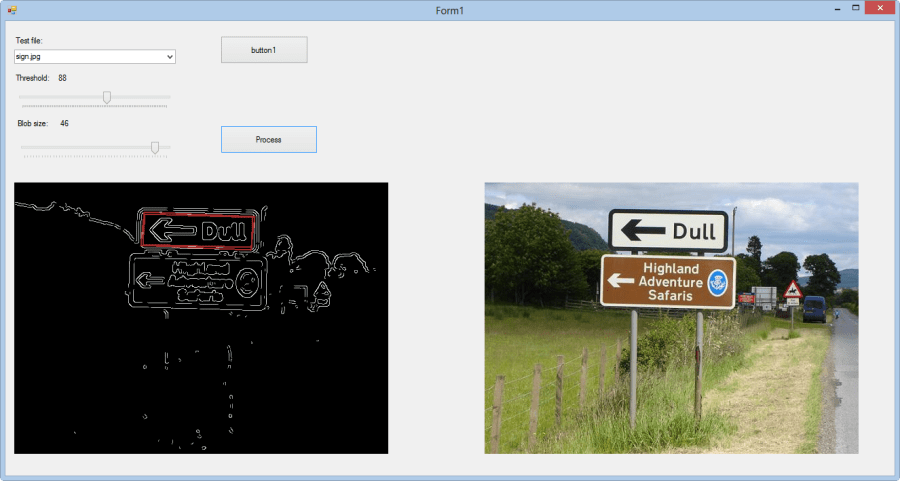
I have been spending some time recently with Udacity Robotic car AI course & looking into computer vision with some interesting libraries such as AForge. Some of the maths involved is a bit of a mystery to me still but these are interesting areas for me.

Below is my test example where I am trying to narrow it down to detect the sign (random picture from Google images):

29-12-2012 6-56-57 PM

Ajax – a user’s guide

There are a number of AJAX related issues I think are commonly ignored such as how to handle connection timeouts, how to handle server side errors and how to serialize dates. I noticed the majority of books on Ajax subject are really out of date (most published around 2006!) and I want to start putting together what I hope will one day become a pretty decent living reference on how to handle these various scenarios.

I had mixed experiences writing for a mainstream publisher (I actually had to order my own book as publisher still hasn’t sent me a single copy  4 months after publishing it grrrr!..) and this is a fluid area so I am going to take a very different approach with writing this.

The contents going to be available online as it’s written & can be commented on!

At the moment I am thinking of doing this using Google doc’s– you can see my current planning (not much there yet) for this at: https://docs.google.com/document/d/1yDLfxPElTWhmrMyr1j3uPnm2KeS23XV7uw3XkMVlwUA/edit?pli=1

Personal

  • Further education
  • Trip to Japan
  • Martial arts

Further education

Last year I completed Cert IV Personal Training. It was really refreshing & interesting to learn about a subject completely different from my main job. I want to do another course but not sure in what yet.

Trip to Japan

Both myself and my partner have always wanted to travel to Japan so we are looking at doing this in Australian winter time to have something to look forward to.

Martial Arts

Physical activity is a big part of my life – I have a lot of energy and without exercise to burn it off am quickly climbing the walls! If you train hard and determined enough sooner or later you will find where your weak areas are. After some injuries the last year I realised I needed to balance things a bit better and work on some weak areas such as flexibility and range of motion .

I wish you all the best in 2013 🙂

Alex