DDD Melbourne 4 – voting now open!

I am pleased to announce that DDD Melbourne 4 voting is now open so head over to www.dddmelbourne.com and let us know which sessions you want to see!

This will be the 4th year we have held DDD Melbourne. The conference has grown quickly with just under 250 delegates attending last year and we expect to have even more this year with the addition of an extra track. I found it interesting this year that we had sponsors coming to us rather than us chasing various companies for support which was a good sign that our reach was expanding.

Although I am biased I think we now have one of (if not the) best development conferences in Australia – especially for the tiny sum of $25 which includes catering throughout the day!

This year we had 48 session submissions in a wide range of subjects offering great choice for attendees – I am excited to see which sessions get selected once the voting results are in next week.

We have made a few changes to the format this year:

  • New keynote – Joe Albahari author of LINQPad and C# 5 in a nutshell will be telling us all about programming over space and time
  • A workshop track for those delegates wanting more interactive sessions with workshops in Angular.js, Git, JavaScript and LINQPad
  • Better quality catering – catering is our most expensive item and this wouldn’t have been possible without the support from our generous sponsors
  • Improved web site – yes I know there are a few things that could be improved especially around the voting page but we all have day jobs & we accept pull requests 🙂
  • No lock note – everyone wants to get down the pub/home & who are we to get in the way?
  • Improved registration process on the day

I would like to thank my co-coordinators Lars Klint and Mahesh Krishnan and especially the gold sponsor’s Kiandra, Infragistics, Readify and 99 designs for without these guys we wouldn’t be able to put on such a great conference.

We will be opening booking next week – hope to see you there.

Intro to RxJS

RxJS is the JavaScript version of a .net library that amongst other things makes it easy to handle, combine and filter events.

I gave a talk about RxJS last week – my slides and code examples are available here.

On a recent project a colleague (Hendry Luk) suggested we utilize RxJS to solve a tricky issue we were having. We were developing a web based calculator to be used by financial consultants. The calculator contained a number of fields the consultants could modify to then see the effect they would have on their clients income. The client wanted the output to be automatically updated when any changes were made. Our initial implementation felt a bit clunky as we bound to every key press, select box change etc. Thus when a user was typing into a textbox a request was made on each key press and the output rebound.

There is obviously a few ways to solve this but RxJS made it very easy. RxJS allowed us to throttle this process and ignore out of date values e.g. if a value was changed before a pending response had returned.

For me I think getting started with Rx is probably the hardest part as there are currently few very basic examples around and it can be a bit confusing whats actually going on.

Let’s create a simple hello world example to demonstrate some of the main concepts.

We will create a simple web page containing a single button that does the following:

  • When the button is clicked we will ignore the first 2 clicks
  • We will display an alert for clicks 3 and 4
  • After clicks 3 and 4 an alert box saying “done” will appear

Let’s get started, first create a new html page called helloRx.htm.

RxJS has many different libraries (see above section) that offer rich functionality such as extensions for working with jQuery, testing & combining events but for our example we just want the core library (rx.js) so let’s import this:

<script src="rx.js"></script>

Now we want something that will trigger an event (an observable in RX terminology) so add a button to the page:

<button id="button">Click me!</button>

Now we need to turn the buttons click event into something RX can work with so we will create a function that wraps the Rx.Observable.create method (note the rx.jquery.js library allows you to do this in one line with methods such as clickAsObservable):

function CreateObservable(element, eventType) {
return Rx.Observable.create(function(observer) {
function eventHandler (eventObj) {
observer.onNext(eventObj);
}
//keep simple for this example and ignore addEventListener/attachEvent browser differences
element.addEventListener(eventType, eventHandler);
return function() {
element.removeEventListener(eventType, eventHandler);
};
});>
};

Now we will use this function to create an observable from our buttons click event. We will also use the methods skip and take on our observable to skip the first 2 clicks and tell rx we are only interested in the next 2 clicks.

var observable= CreateObservable(document.getElementById('button'), 'click')
.skip(2)
.take(2)
.select(function(evt){
return "button was clicked"
});

Next we need to create an observer to monitor our observable:

var observer = Rx.Observer.create(
//onNext
function(evt) {
alert(evt);
},
<p>//onError
function(err) {
alert('error');
},
<p>//onComplete
function() {
alert('done');
}
);

Note how you can (optionally) pass 3 functions into Rx.Observer.create method. The first (onNext) handles an event occurring, the second errors and the third completion of an observable sequence.

Finally we need to link (or subscribe) the observer to our observable with a call to the observables subscribe method:

observable.subscribe(observer);

Now run this in the browser and congratulate yourself for getting started with RxJS!

Whilst this wouldn’t be too hard to accomplish with traditional methods you can start to get an idea of the power and readability offered by Rx.

2013 goals

This post is more for my benefit than anyone else’s – last year I found it useful to write up what I hoped to achieve in 2012 and reflect on the previous year’s aims (https://alexjmackey.wordpress.com/2012/01/07/2012-goals/).

I’m a big believer in how putting your aims down (and in public) can help you commit to them.

2013 was a somewhat mixed year for me (inc a missed Fiji holiday due to some bad taxi driving!) but highlights included:

  • Getting engaged – yes best put this one first!
  • A trip to Europe (UK, Spain, Norway) to see family & friends for a well needed break
  • Attending NDC conference – highly recommended & by far the best run conference I have ever been to
  • Winning an internal company award (whilst still at Readify)
  • DDD Melbourne 2012 ran smoothly with just under 250 delegates & speakers. Once we get approval from Australian tax office I reckon we will also be able to make a donation of around $1000 to charity and still have plenty of funds left for next year’s ideas 🙂
  • Getting Introducing .net 4.5 book out (and making some money for Cancer Council Australia out of the sales)
  • MVP renewed
  • Starting new job at Kiandra

So what for 2013?

Technical

  • Continue AI research
  • Start writing Ajax – a users guide
  • Learn more about Photoshop

Continue AI research

It’s easy when the majority of your work is about putting data into databases to forget about some of the more interesting areas of computer science. We had a great project at Kiandra recently that involved writing a simulation for a business idea – very different challenge to the usual fare.

I have been spending some time recently with Udacity Robotic car AI course & looking into computer vision with some interesting libraries such as AForge. Some of the maths involved is a bit of a mystery to me still but these are interesting areas for me.

Below is my test example where I am trying to narrow it down to detect the sign (random picture from Google images):

29-12-2012 6-56-57 PM

Ajax – a user’s guide

There are a number of AJAX related issues I think are commonly ignored such as how to handle connection timeouts, how to handle server side errors and how to serialize dates. I noticed the majority of books on Ajax subject are really out of date (most published around 2006!) and I want to start putting together what I hope will one day become a pretty decent living reference on how to handle these various scenarios.

I had mixed experiences writing for a mainstream publisher (I actually had to order my own book as publisher still hasn’t sent me a single copy  4 months after publishing it grrrr!..) and this is a fluid area so I am going to take a very different approach with writing this.

The contents going to be available online as it’s written & can be commented on!

At the moment I am thinking of doing this using Google doc’s– you can see my current planning (not much there yet) for this at: https://docs.google.com/document/d/1yDLfxPElTWhmrMyr1j3uPnm2KeS23XV7uw3XkMVlwUA/edit?pli=1

Personal

  • Further education
  • Trip to Japan
  • Martial arts

Further education

Last year I completed Cert IV Personal Training. It was really refreshing & interesting to learn about a subject completely different from my main job. I want to do another course but not sure in what yet.

Trip to Japan

Both myself and my partner have always wanted to travel to Japan so we are looking at doing this in Australian winter time to have something to look forward to.

Martial Arts

Physical activity is a big part of my life – I have a lot of energy and without exercise to burn it off am quickly climbing the walls! If you train hard and determined enough sooner or later you will find where your weak areas are. After some injuries the last year I realised I needed to balance things a bit better and work on some weak areas such as flexibility and range of motion .

I wish you all the best in 2013 🙂

Alex

Thoughts on developing resilient Ajax code (Part 2 – ASP.net MVC)

In my last post we looked at different methods to indicate a call to a service that would return JSON was unsuccessful.

The conclusion was that we really want to be setting the HTTP status code of the response to indicate a request was unsuccessful.

In this post we will look at some possibilities for wrapping this logic up in ASP.net MVC controller methods (and there are many).

We want a way of:

  • Setting the status code of the response
  • Including in the response our errors formatted as JSON
  • Something that’s easy to reuse and maintain

The most obvious (and least reusable) option is probably something like:

Response.StatusCode = (int) HttpStatusCode.InternalServerError;
return Json(new { data = "bad error" });

We could also use the HttpStatusCodeResult class however this only allows us to set the description of the error status code rather than the body of the response:

return new HttpStatusCodeResult(HttpStatusCode.InternalServerError, "bad error");

We could remedy this with something like this:

Response.Write("bad error");
return new HttpStatusCodeResult(HttpStatusCode.InternalServerError, "bad error");

But we also want to format our response as JSON and set the return content-type to application/json so would then have to do something like this:

var errors = new List<string>() {"Bad error", "Another bad error"};
var serializer = new JavaScriptSerializer();
Response.ContentType = "application/json";
Response.Write(serializer.Serialize(errors));
return new HttpStatusCodeResult(HttpStatusCode.InternalServerError, "bad error");

Yuck!

This is getting a bit messy & we want something easy to use, maintain & test.

ASP.net MVC is very flexible and we have a number of different ways to do this but I reckon inheriting from JsonResult works pretty well for our purposes:

public class JsonErrorResult : JsonResult
{

private readonly HttpStatusCode _statusCode;

public JsonErrorResult(HttpStatusCode statusCode)
{

_statusCode = statusCode;

}

public override void ExecuteResult(ControllerContext context)
{
context.HttpContext.Response.StatusCode = (int)_statusCode;
base.ExecuteResult(context);
}

}

With this new type of ActionResult we get all the functionality of JsonResult and can also set the status code of the response easily:

var errors = new List<string>() {"Bad error", "Another bad error"};
return new JsonErrorResult(HttpStatusCode.InternalServerError) {Data = errors};

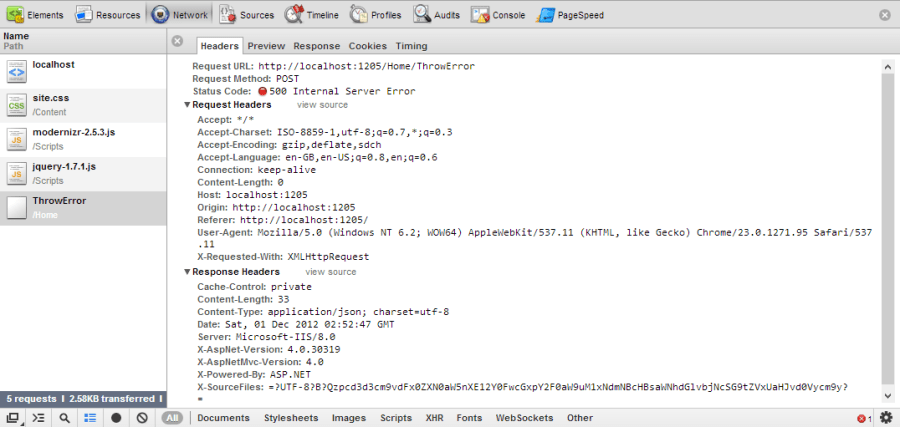
If we use browser tools we can see the Http status code was set correctly to 500, the content type is application/json and the response body contains our json encoded messages for later display:

1-12-2012 1-53-19 PM

Another option is to create a custom Action filter (this can be shortened by returning a JsonErrorResult as above):

[AttributeUsage(AttributeTargets.Class | AttributeTargets.Method, Inherited = true, AllowMultiple = false)]
public class HandleErrorAsJsonResponseAttribute : ActionFilterAttribute, IExceptionFilter
{

public void OnException(ExceptionContext filterContext)
{

if (filterContext.HttpContext.Request.IsAjaxRequest())
{

filterContext.HttpContext.Response.StatusCode = (int) HttpStatusCode.InternalServerError;
filterContext.ExceptionHandled = true;
filterContext.Result = new JsonResult
{
Data = new { errorMessage = filterContext.Exception.Message}
};

}

}
}

This is very easy to apply (and can be done so at method, controller and even application level):

[HandleErrorAsJsonResponse]
public ActionResult ThrowError()
{
throw new Exception("bad exception");
}

I think these serve my purposes pretty well but if anyone’s got better ways of doing this I would love to hear them 🙂

Next up what’s jQuery actually doing in $.ajax

Thoughts on developing resilient Ajax code (Part 1)

This sunny afternoon I was writing an ASP.net controller method to return JSON data from a calculation service.

As we all know things can always go wrong in code (and not necessarily just because I wrote it!) and this got me thinking about best practice when making and handling Ajax calls.

There are a number of issues we need to think about if we want to avoid the terrible situation of our users not being able to buy 1000’s of those new silver cat widgets we have been flogging because a vital Ajax shopping basket related request failed such as:

  • Errors encoding our request & its body before we have even sent it – maybe the users entered something dumb (did you let them? or are they a hacker and up to no good)
  • Timeout’s & a user’s session ending – e.g. the user felt the need for coffee and got caught up in a discussion about how would win in a chainsaw fight between the neighbours and home & away cast (dodgey Australian tv series)
  • Server side errors (you probably screwed something up)
  • Issues reading/decoding the response (see above)
  • Transient network conditions – those times things fail and no one’s really er sure why as it works if you try again

Mobile web applications in particular are very vulnerable to transient network conditions. I started (and forgot about) building a wrapper to retry requests which ill get round to looking at again sooner or later (https://github.com/alexmackey/retryajax).

Ok so what do we mean by resiliency?

Well to me in this context it means:

  • Having a service that works almost always
  • Something that can recovers from temporary errors such as timeouts without crashing the whole application
  • ..or failing the ability to recover provides sensible information about what might have gone wrong (and if there’s anything a user can do to remedy/help)
  • Handles a decent number of requests
  • Ideally it would also be really really nice if we had some info about what went wrong and if something went wrong so we could fix it

As you can see there are a decent number of issues here and some of these aren’t as straightforward to solve as they  may first appear so I am going to first look at how to return a valid/invalid response at a high level.

I guess there are three main (and combination of) ways to handle this:

  • Set a relevant HTTP status code on the response and potentially populate the body with some details of the error
  • Return a standard HTTP 200 everything’s peachy response and set a status code in the responses (true/false & success/fail seem in pretty common usage)
  • Don’t do anything

A lot of websites actually do the third option and assume that every AJAX call is going to work out fine and dandy (have a look in your browsers network tools & JavaScript console next time you are bored). I think we can all agree isn’t a good idea unless it’s a particularly trivial request.

Anyway since there were a variety of methods in use I wondered if people had a preference for how this was done so put this out to Twitter:

“If you were calling service to get JSON formatted data & error occurred would you prefer http error code to be set or 200 & error in json?”

Of course this being Twitter and the fact that it’s always dangerous to ask for peoples opinion I got a mix of useful and not so useful replies including:

The general consensus was that appropriate Http status code’s should be set before returning the response.

Why?

Well this approach has a number of advantages such as:

  • Http status code integrate nicely with various JavaScript libraries error handling routines like jQuery’s global .ajaxError and error methods
  • Its potentially easier for people to integrate with our service as its nice, descriptive & potentially RESTful in nature
  • Its easy to spot error status codes in Fiddler/browser tools/logs which helps if something goes wrong

And I would agree setting a status code is probably the best approach.

Can this lead to some ambiguity?

Let’s say we had a method that allows the retrieval of an individual entity by Id. We call it and get a  404 Not found – is my requested entity missing or do I have the wrong URI?

Or how about  we get a 401 (Unauthorized) were we unauthorized to call the Api or have we screwed up our security configuration?

Well I don’t think these are going to be too tricky to deal with as we can always include additional information in our response, status codes are a pretty accepted way of doing things and I think the benefits outweigh any confusion so let’s stick with using Http Status codes.

Now let’s look at how to set these codes in ASP.net & ASP.net MVC.

ASP.net MVC & ASP.net offer numerous ways (ASP.net Web API has more) to set the HttpStatusCode of a response (note there is a nice enum of the various codes called HttpStatusCode) including:

Response.StatusCode = 404;

throw new HttpException(404, “Um where’s it gone”);

return HttpNotFound();

return new HttpStatusCodeResult(404);

There are however a couple of potential pitfalls to watch out for when using with ASP.net & ASP.net MVC as certain error codes will trigger behaviour in IIS/ASP.net MVC framework which might not give you what you would expect:

  • Returning 404’s (not found) will kick in IIS’s 404 page without disabling this Response.TrySkipIisCustomErrors = true;
  • Http 401’s (unauthorized) depending on your authentication setup will send you off to the login page (aspnet.suppressformsredirect NuGet package apparently will prevent this)

Well none of these are too tricky to deal with so I am not overly concerned by these and they shouldn’t stop you from using HttpStatusCode to indicate the status of your request.

So in conclusion:

  • Use Http status codes they work well with libaries, help debugging and are an accepted way of doing things
  • Be consistent – a mix of approaches is really bad news

Next up – implementing this in ASP.net MVC..

How accurate are IE developer tools for testing previous versions?

Most web developers will hopefully test their sites and applications in a variety of browsers. It’s probably fair to say that the older versions of Internet Explorer in particular can cause even the most experienced dev to tear their hair out with their differences in rendering behavior and implementation of various DOM APIs so it’s always been particularly important to test a site in older versions of the big blue E.

I think IE 9 & 10 have done a pretty good job of keeping to standards so I don’t think this will be such a big issue in the future (that’s not to say you shouldn’t test these versions) but there are still a heck of a lot number of people using IE & and IE 7 (yes that’s your parents and big corporate’s with huge hulking Windows XP based networks) which means testing these previous browsers is still important – I don’t think my clients would be too happy if a significant portion of their customers couldn’t access their site or application.. 🙂

IE dev tools and testing previous versions

Since version 8 IE has contained an integrated set of development tools (available as a separate download for earlier versions) which amongst other features offer the ability to simulate older versions of the IE. This can give you a nice quick way to test how your site will function all the way back to good old IE 7.

To access this functionality hit F12 or right click inspect element on a page.

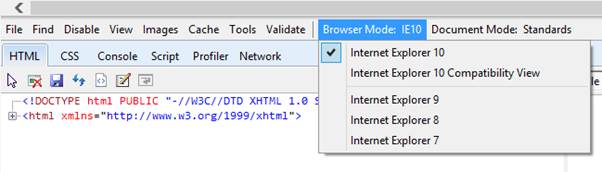
The below screenshot shows the development tools in IE 10:


But wait what is the difference between Browser and Document mode and more importantly how accurate a simulation is this of earlier versions of IE?

First let’s discuss browser & document mode..

Browser mode and Document mode

Document mode is important as changes how a browser renders a page, processes CSS & JavaScript and (in Browser modes case) how a browser identifies itself to the web server.

Determining the mode used to render a page is quite a complex process – see http://blogs.msdn.com/b/ie/archive/2010/03/02/how-ie8-determines-document-mode.aspx.

The following can influence the document mode a page is rendered in:

  • Browser & Document mode setting in the dev tools
  • Conditional comments and HTTP headers
  • Compatibility view list
  • Doctype (or lack of)

You can force IE to render a page in a particular document mode by using special meta tags or setting certain HTTP response headers. This might be useful for example in telling IE how to render content in a legacy intranet application where you don’t have control over the source and it displays better in IE7 quirks mode.

It can seem a bit un-intuitive & confusing that IE dev tools has two separate modes (which do overlap in functionality) but this split allows you finer control over how a page is displayed, the ability to override browser defaults and to test how a page would display in scenarios such as compatibility mode.

Compatibility mode is a way of emulating earlier versions of IE so a page displays properly – Microsoft maintain a list of sites that should be rendered in this mode and you can add sites to your own local version of this list in compatibility view settings.

OK back to our testing question let’s look at the differences between document and browser mode:

Document mode

  • Does not modify the user agent string that is sent to a web server
  • Determines how mark-up will be rendered
  • Will re-render a page if changed in dev tools but won’t make another request to a web server

Browser mode on the other hand:

  • Modifies the user agent string that is sent to a web server
  • Changes how conditional comments in html will be evaluated
  • Determines the Document mode that will be used by default (see above)

Probably the main difference as far as we are concerned is the user agent string that is sent and the defaulting of document mode. With default browser settings the user agent string that is sent to a web server from my Windows 8 machine and IE10 is:

Mozilla/5.0 (compatible; MSIE 10.0; Windows NT 6.2; WOW64; Trident/6.0)

If I set just the document mode to IE 7 then the user agent string will not change although a different rendering mode will be used.

If however I set the browser mode to IE7 then the following UA string will be sent:

Mozilla/4.0 (compatible; MSIE 7.0; Windows NT 6.2; WOW64; .NET4.0E; .NET4.0C; .NET CLR 3.5.30729; .NET CLR 2.0.50727; .NET CLR 3.0.30729; InfoPath.3)

You can try this by using the network tab and examining the user agent header.

User agent

Some frameworks (ASP.net for example) and some (cough.. badly written) JavaScript use the user agent string to present a different experience for users so for the closest simulation you probably will want to ensure you use the Browser mode setting so the correct user agent string is sent and then check the document mode is set correctly for the scenario you are testing.

For example if you want to test a page with a doctype in IE7 standards mode you can set the browser mode to IE7 (the IE7 user agent string will now be sent) and ensure the document mode is set to standards mode.

If you want to test how an IE7 user viewing it in compatibility mode would view the page you can set the browser mode to IE7 and the document mode to Quirks.

OK so we understand the importance of the browser & document mode but we haven’t answered how IE simulates previous versions yet so let’s look at browser sub systems now.

 Browser sub systems

Your average browser is a complex beast and is made up of a number of subsystems such as:

Rendering engine

  • JavaScript engine
  • Network engine
  • Security systems
  • And many others..

It will come as no surprise to learn that different versions of a browser have different versions of these components.

So does IE contain previous versions of individual subsystems to enable you to simulate earlier versions?

No.

..however depending on the component in some cases kind of – it depends on the subsystem (and no I sadly don’t have a list).

One of the big things that is not simulated when you use the IE dev tools to simulate previous versions is security related changes. This makes sense because it would be a really bad thing if you could force the browser into an earlier security mode that contained various potential system compromising flaws. This means you will never get a 100% accurate simulation of how an earlier browser would process a page although this probably won’t affect the majority of scenarios users will be testing.

There are some components that are completely different in newer versions of Internet Explorer such as the JavaScript engine (the latest is called “Chakra” to its friends) that try and replicate older bugs & hide unavailable functionality when earlier versions are simulated which of course may not be a 100% accurate simulation.

However there are also some other components such as the DOM selection engine that although a later version still also contain the older code so it can be simulated meaning you are probably getting a fairly accurate simulation of how something might have worked previously.

Of course if every version of every component was shipped with each version of IE it would be a massive install, the maintenance would be a nightmare and there could be memory implications for loading previous versions of components.

All this however points to the conclusion that for a 100% accurate simulation of earlier versions of Internet Explorer you are going to have to use an earlier version of internet explorer L

So what to do…

Well I guess you could set up a number of virtualized instances allowing you to test every possible version of a browser but few teams are going to have the resources to do this so and hey that sounds like a heck of a lot of work!

My recommendation would be to instead use a service like browserstack.com or spoon.net that contains virtualized versions of earlier browsers all nicely setup for you. These services are inexpensive and allow you to simulate many different browser versions (and even offer other browser options such as mobile devices).

Secondly it’s a good idea to review the compatibility cookbooks that Microsoft release when they ship a new version of Internet Explorer as these can assist in giving you a heads up of breaking changes: http://msdn.microsoft.com/en-us/library/ie/hh771831(v=vs.85).aspx

Thanks to IE team for assistance in this article.

What is TypeScript?

This week Microsoft released a preview of a language called TypeScript that adds additional features to good old JavaScript (a language I’m sure some of you don’t like that much). TypeScript auguments JavaScript with additional features such as strong typing, classes & interfaces and lambda syntax. These features are aimed at facilitating development and also make possible some interesting IDE features such as intelli-sense and compile time checks.

I was sceptical at first at the idea of TypeScript with my initial reaction being –do we really need such a language when we have the much more mature languages such as coffeescript etc for adding additional functionality?

I guess I am not entirely convinced by the concept of a language that sits on top of another to provide minor enhancements (ignoring the fact many languages could be considered to work this way) such as CoffeeScript for the following reasons:

  • Maintainability – other people have to maintain the code and in the example of CoffeeScript it’s hard enough to find decent JavaScript devs in the Microsoft space let alone one that knows CoffeeScript as well
  • CoffeeScript is another language to learn with quite different syntax and I am unconvinced the benefits are worth the investment from learning it – my understanding is CoffeeScript enables a nicer, terser syntax and prevents you falling into a few traps (learn JS properly I always thought) big woo!
  • Debugging is going to be a pain in the butt as a coffee script file looks pretty different from a JavaScript file

So does TypeScript suffer from some of these issues?

Well the first thing you notice about TypeScript is that its immediately recognizable as JavaScript which isn’t so surprising given that a valid JavaScript file is also a valid TypeScript file.

TypeScript files are compiled into plain old JavaScript so they can be run on anything that JavaScript can. There is also a Node.js package for TypeScript if you’re a hipster – like Aaron Powell who I dreamt a few nights ago was teaching me the electo synth but I digress..

To get the most of TypeScript you want to install the Visual Studio extension which gives you syntax checking, intellisense etc. This allows you to create TypeScript (.ts files) and when you build have TypeScript check for various issues. This will also install the typescript command line compiler tsc

ts_commandline

Note how TSC has some additional options including version of ECMA script to compile to and options to export modules etc.

TypeScript is open source so there is nothing stopping anyone else from developing add ons for other IDEs and apparently there is already basic text editor support for editors such as Sublime & EMACs. The TypeScript compiler source is also available which is interesting to see how this kind of thing works.

So let’s look at some of the features TypeScript gives you.

Typing

It’s probably little surprise that a language called TypeScript includes some stuff to do with Typing. Typing I guess is a little weird in JavaScript and something that can be a bit tricky to understand & predict in its more esoteric cases.

Types in TypeScript can be number, bool, string or any (anything else). Apparently there is also a void type for indicating a function doesn’t return a value but I don’t know much more at this stage.

TypeScript allows you to add information about types so that the compiler can use to spot mistakes and give you intellisense e.g.:
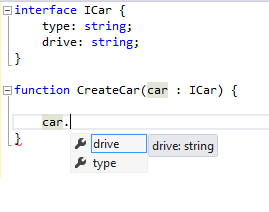
So how do you indicate a variables type? A simple example is shown below:

function doSomething(x: string, y: number) {

}

The type attributes allow the compiler to catch errors such as

doSomething(“hello”, “will fail as im a string”);

It will also catch errors where you don’t supply enough arguments to a function e.g.

doSomething(“blah”);

If you want to declare an argument as optional you can do so by appending a question mark to the variable name:

function doSomething(x: string, y?: number) {}

Interfaces

TypeScript adds interfaces which you can reference which can assist with compile time checks e.g the function below expects an object conforming to ICar:

interface ICar {

type: string;

drive: string;

}

function CreateCar(car : ICar) {}

We can use these interfaces to indicate the type of parameters we are expecting on our methods. This enables Visual Studio to give us more information about the class and also catch any invalid function calls.

Classes

JavaScript has always enabled you to emulate traditional OOP constructs such as classes although they can look a little esoteric and there are some traps to catch you out. TypeScript gives you a nice syntax for declaring a class and its constructor:

class Person {

public name: string;

constructor(name: string) {

this.name = name;

}

whatsMyName(): string {

return this.name;

}

}

var p1=new Person(‘alex’)

This compiles to:

var Person = (function () {

function Person(name) {

this.name = name;

}

Person.prototype.whatsMyName = function () {

return this.name;

};

return Person;

})();

var p1 = new Person(‘alex’);

Which is probably pretty similar to what you would have written in js anyway..

You can also mark properties as private which seems to hide them from intellisense but doesn’t actually seem to change the generated JS as far as I can see at present.

Static modifier

You can declare static methods like so:

class person {

static DoSomething(){

}

}

person.DoSomething();

Inheritence:

TypeScript has a great syntax for inheritance which was always a bit gnarly in pure JavaScript and contained a number of traps if you didn’t call functions in the way they were expecting:

class Person {

public _firstName: string;

constructor(public firstName: string) {

this._firstName = firstName;

}

}

class Employee extends Person {

public _company: string;

constructor(public firstName: string, public company:string) {

super(firstName);

this._company=company;

}

}

var alex=new Employee(“alex”, “kiandra”)

Generates:

var __extends = this.__extends || function (d, b) {

function __() { this.constructor = d; }

__.prototype = b.prototype;

d.prototype = new __();

}

var Person = (function () {

function Person(firstName) {

this.firstName = firstName;

this._firstName = firstName;

}

return Person;

})();

var Employee = (function (_super) {

__extends(Employee, _super);

function Employee(firstName, company) {

_super.call(this, firstName);

this.firstName = firstName;

this.company = company;

this._company = company;

}

return Employee;

})(Person);

var alex = new Employee(“alex”, “kiandra”);

Eek! you probably didn’t want to write that stuff yourself!

You can even downcast types and have them checked for type safety:

var alexAsPerson = <Person> alex;

Lambda syntax

As a C# dev I love the lambda syntax that TypeScript gives me (this syntax is also a proposal in ECMA6)

var calculator={

addTowNumbers: (x,y) => {return x+y}

}

This compiles to:

var calculator = {

addTowNumbers: function (x, y) {

return x + y;

}

};

Nice!

Modules

One of the harder aspects of JavaScript is keeping everything organized and reusable.  TypeScript gives you a nice syntax to declare modules and exports to keep your code organized:

module Utilities {

export class AddTwoNumbers {

private _x:number;

private _y:number;

constructor (x: number, y: number) {

this._x=x;

this._y=y;

}

add():number {

return this._x + this._y;

}

}

}

var calc = new Utilities.AddTwoNumbers(1,2);

calc.add();

So what next?  

Well there is a little documentation & tutorial on the main site at http://www.typescriptlang.org and a test page that allows you to enter TypeScript and see the JavaScript it compiles to. But for a more detailed look head over to Channel 9 at http://channel9.msdn.com/posts/Anders-Hejlsberg-Introducing-TypeScript, Anders discusses a number of features not on the mains site such as exporting functions and the interface files.

However to really get into TypeScript at the moment you are going to have to look at the source code as there isn’t too much doco around yet but im sure this will change 🙂

Conclusion

Things I like:

  • TypeScript was easy to pick-up and still felt like I was writing JavaScript
  • It still looks like JavaScript and would be easy to maintain
  • It offers additional intelli-sense and syntax checking
  • The generated script follows existing & proposed standards. Microsoft say they are keen to keep in line with these standards as they develop
  • The syntax for class generation is much nicer than writing it yourself
  • Everything is open source & you can even see how the compiler works – which is also written in TypeScript which hurts my head 🙂

Things I don’t like:

  • Not much actually

But…I guess I have never really been burned by JS’s typing system or lack of compile time checks so I do wonder how useful some of these features will be.

Having said that on one of my previous consultancy engagements the client complained of a dev making a syntax error and breaking all the JS on the site so maybe something like TypeScript could avoid these types of issues (or possibly a better code structure or deployment/testing process!). Having constructs such as interfaces & modules available I guess could be important in larger environments for large teams working together.

Anyway I suggest you give it a go – I liked what I saw so far & it will be interesting to see how this project develops.

Introducing .net 4.5 book

About two years ago, I wrote a book (Introducing .NET 4.0 with Visual Studio 2010). This was an ambitious (and time-consuming!) project where I set out to provide a high-level overview of all the major changes across the framework from ASP.NET to WCF.

When writing it, I tried to keep in mind the following objectives:

  • Give the reader an introduction to new technologies
  • Show how to perform the basics that any developer would want to know
  • Produce examples that are as simple as possible but still demonstrate the concept
  • Don’t get too bogged down in detail so the book can still be easily read

The book was well received (although not quite as well as one involving wizarding schoolchildren, lame-ass vampires or perhaps more recently a very bad (so I hear!) erotic novel). Thus, despite promising myself that I wouldn’t write another book in a hurry, I find myself writing about the changes in .NET 4.5 and Visual Studio 2012.

This book has the same aims as the previous book. However, I have also made a few changes to address what I felt were weaknesses of the first text.

Given the breadth of the subject matter, it was impossible to cover all the subject areas in as much detail as each topic deserved. Some chapters of the first book were much stronger and more in-depth than others. Sometimes the level of depth reflected the information available, but my own areas of interest and knowledge also influenced how thoroughly I covered any given topic.

So, this time—with the added bonus of not having to do quite as much work!—I have taken some friends and colleagues along for the ride.

It is my pleasure to introduce you to my fellow authors, Mahesh Krishnan and William Tulloch. I had the (dubious?) pleasure to work with Mahesh and William at the Australia-based consultancy Readify. Mahesh specializes in the areas of Azure, WCF, and Silverlight, and he is the author of Microsoft Silverlight 4 for Dummies. William specializes in WCF and WIF.

Im pretty happy with the content of the book and think we give a good intro to the various new features available. If you want a really deep look at the various changes or a reference to keep on your shelf then this probably isnt the book for you (I really like Joseph Albahari’s C#5 in a nutshell). If however you want a light hearted, easy to read introduction and can put up with my terrible sense of humour then I think you will enjoy it and it will get you up to speed quickly.

As is always the case <sigh> after going to print a few issues are found (I am keeping track of these at http://www.simpleisbest.co.uk/what-we-screwed-up) our apologies for any future typo’s etc that will undoubtedly be found.

Thank you to everyone that assisted with putting the book together, contributed their experiences or advice or explained something in more detail to us – we couldn’t have done it without you.

Ill also be donating 50% of my earning from this book to Cancer Council Australia.

You can order the book from Amazon via this link.

Alex

retryAjax – retry jQuery ajax requests

I wanted to write a little wrapper for jQuery’s Ajax function that would retry a request in the event of a transient failure. This could be quite a common scenario for a mobile optimized website where a users mobile device moves out of signal area briefly. I also wanted to add the ability to increase the time between request attempts with a backoff function so as not to waste requests.

I played around a bit with proxying jQuery’s core Ajax function in the sameway jquery-mockajax  does. I also discovered some other interesting options using jQuery prefilters which I wasnt aware of existed but will certainly be taking a deeper look into.

Anyway I settled on adding another method called ajaxWithRetries.

It’s my first stab at this on a lazy sunday arvo so its likely to be quite buggy (current retry count is not specific to an individual function for example) & I havent tested it on various browsers so use at your own risk 🙂

Its up on github at https://github.com/alexmackey/retryajax


Hello Kiandra IT

After 2 years and about 5 months I have decided to leave Readify to work for the Melbourne consultancy Kiandra IT (http://kiandra.com.au/) and in just over a weeks’ time will have to do some work again after a few weeks off 🙂

Readify has been a great experience and I hope I’ll still keep in touch with many of the staff.

My initial impressions of Kiandra have been excellent from the very welcoming and enthusiastic staff at my interview to a nice bottle of wine & company t-shirt couriered with paperwork on acceptance of offer to their recent wins of a number of industry awards.

I’m really looking forward to having a desk again and getting stuck into some longer term projects. I have to admit I am a little concerned to be working with Mr Lars Klint (http://klint.co/) but am hoping the other excellent staff will offset his inane ramblings & madness 😉

Don’t worry this move doesn’t mean I won’t be any less involved with the user group and Melbourne dev community 🙂 

As I write this Kiandra is currently looking to fill a number of roles in testing, UX and Business Analysis so why not take a look and join us at: http://kiandra.com.au/join-us/