Theory of constraints – or why you may be wasting your time

A few months ago I attended an excellent session at the LAST conference given by a guy called James Ross on Theory of Constraints (the session abstracts here: http://lanyrd.com/2012/last-conf/swycf/).

Theory of Constraints (TOC) was developed by a guy called Eliyahu Goldratt who sets out the idea in a book called the Goal (http://www.amazon.com/The-Goal-Process-Ongoing-Improvement/dp/0884271951/ref=sr_1_1?ie=UTF8&qid=1347002336&sr=8-1&keywords=the+goal).

It’s an unusual book in that the idea is presented by telling the story of a plant manager of a failing manufacturing plant. The main character is given 3 months by his bosses to turn the plant around and the book takes the reader through how he achieves this and the problems he encounters along the way.

The book is well worth a read (if only for its unique fiction style!) but the short version is that a system is limited by its slowest part.

An example – well let’s say we have a very simple system made up of 3 processes (imaginatively called A,B,C) that can each produce an arbitrary number of widgets (shown in brackets next to the process name) in one equally arbitrary time segment. Each process depends on the output of the predecessor:

Process A (5) -> Process -> B (5) -> Process C (2)

What’s the maximum output such a system can have?

Well despite A & B being able to produce 5 widgets the maximum output this system can ever have is 2 as Process C can only ever produce 2 widgets.

This means that if you are putting a lot of effort into improving Process A you are wasting your time as the maximal output will only ever be 2. If we want to improve the output of the system we should concentrate our efforts on Process C.

Of course a real system will also have fluctuations e.g. maybe there is a minor cockup, someone is sick so a more realistic output maybe more like:

Process A (3-5) -> Process -> B (3-5) -> Process C (1-2)

In our example we want to make sure that Process C is running as fast as possible otherwise everything slows down. Thus we might employee additional staff in Process C as a buffer as even if they don’t do anything 50% of the time we don’t want this bit of the system slowing down.

At first this all seems a pretty common sense idea but the outcome of this is that if you are trying to improve something that isn’t a bottleneck in the system any improvements you do get will be very limited (although I guess improvements could have an influence on other areas e.g. people may pick up ideas etc).

Even through the books examples are focussed on manufacturing it’s certainly not just applicable to factory settings. For example the book has an example of kids going on a hike where the unfit tubby kid limits the speed of the others (and im ignoring for now the best way to optimize flow in this scenario).

I believe this example has implications for us as developers and consultants as if we are trying to improve a non-bottleneck part of a system we really aren’t going to make much if any of a difference.

Instead we should be looking at what we can do to alleviate any bottle necks. Maybe this can be done by restructuring the process, hiring more people (even if they end up doing nothing half the time as the bottle neck process is constraining your entire output) or even outsourcing the work.

In software development maybe the bottleneck in your environment is getting requirements, maybe its producing a build, maybe its the testing department.

So in conclusion its important to identify potential bottle necks within your system and focus efforts in these areas.

Websockets with ASP.net 4.5 and Visual Studio 2012

Web applications are becoming increasingly sophisticated and it is common to need to communicate with various services.

There are a number of options to accomplish this task with probably the most popular being to continually poll a server with XHR requests. Other alternatives exist that delay disconnections. These can be tricky to implement and don’t scale well (sometimes worse than polling as they keep a connection open) so aren’t used as much.

HTTP isn’t really an ideal protocol for performing frequent requests as:

  • It’s not optimized for speed
  • It utilizes a lot of bandwidth for every request with various headers etc sent with every request
  • To keep an application up to date many requests must be sent
  • Provides limited cross domain support (relying on workarounds such as JSONP http://remysharp.com/2007/10/08/what-is-jsonp/)
  • Firewalls & proxys sometimes buffer streaming/long polling solutions increasing latency
  • Long polling & streaming solutions are not very scalable

WebSockets are a new technology that attempts to resolve some of these limitations by:

  • Sending the minimum amount of data necessary
  • Making more efficient usage of bandwidth
  • Providing cross domain support
  • Still operating over HTTP so it can transverse firewalls and proxies
  • Works with some load balancers (TCP l4)
  • Provides support for binary data (note some JavaScript implementations don’t currently support this)

When would web sockets be a suitable protocol for your application?

You might want to consider using web sockets in the following scenarios:

  • Games
  • Real time data
  • Chat applications
  • News tickers

There is a nice set of demos at: http://www.html5rocks.com/en/tutorials/websockets/basics/ and an interesting article that compares a Web Sockets and polling solution in terms of latency & throughput at http://websocket.org/quantum.html.

Websockets pitfalls

Websockets is a relatively new protocol that has already undergone a number of versions as various issues are addressed. This is important as support across browsers varies.

At the time of writing Websockets (in some form) can be used by the following browsers (check caniuse.com for the most up to date info):

  • IE10
  • Chrome 13+
  • Firefox 7
  • Safari 5+
  • Opera 11+

Earlier implementations of websockets had some security issues so your connections may work but are not secure (Firefox disabled support in Firefox 4 & 5 for this reason).

The other issue that you may encounter is that some older proxy servers don’t support the http upgrade system that websockets uses to connect so some clients may be unable to connect.

.net 4.5 Web Socket Support

.net 4.5 introduces a number of APIs for working with web sockets. If you find you need more control than the ASP.net API’s offers then look into WCF as that has also been updated.

Before we begin there are a couple of requirements for using ASP.net web sockets API:

  • Application must be hosted on IIS 8 (available only with some version of Windows 8 – please note currently IIS Express currently does not work)
  • Web Sockets protocol feature installed (IIS option)
  • .net 4.5
  • A compatible browser on the client (IE10 or Chrome will 18 work fine at time of writing)
  • It would help if your Chinese birth animal was the horse

Currently Microsoft have no plans to release Websockets support for earlier versions of IIS so if you plan to run it on Windows Server 2008 then you are going to have to look at other options such as http://superwebsocket.codeplex.com/.

You could also look at the SignalR library from Microsoft which is designed for developing async applications and provides WebSockets (and fallback) support: https://github.com/SignalR/SignalR/wiki/WebSockets.

Hello Web Sockets Example!

Ok I am going to assume that you are already working with some version of Windows 8 that has IIS & ASP.net 4.5 installed. The other thing we are going to need to do is make sure IIS has the Web Sockets Protocol feature installed (this is in the add/remove programs bit):

First create a new empty ASP.net project called WebSockets

Add the Nuget package Microsoft.Websockets

Pull down the latest jQuery library and put it in a scripts directory (I am using 1.7.2) – note jQuery isn’t necessary it just saves a bit of tedious event and manipulation code.

Now add a file called index.htm and enter the following code:


<!doctype html>

<head>

<script src="Scripts/jquery-1.7.2.min.js" type="text/javascript"></script>

<script type="text/javascript">

$(document).ready(function () {

var name = prompt('what is your name?:');

var url = 'ws://' + window.location.hostname + window.location.pathname.replace('index.htm', 'ws.ashx') + '?name=' + name;

alert('Connecting to: ' + url);

ws = new WebSocket(url);

ws.onopen = function () {

$('#messages').prepend('Connected <br/>');

$('#cmdSend').click(function () {

ws.send($('#txtMessage').val());

$('#txtMessage').val('');

});

};

ws.onmessage = function (e) {

$('#chatMessages').prepend(e.data + '<br/>');

};

$('#cmdLeave').click(function () {

ws.close();

});

ws.onclose = function () {

$('#chatMessages').prepend('Closed <br/>');

};

ws.onerror = function (e) {

$('#chatMessages').prepend('Oops something went wront <br/>');

};

});

</script>

</head>

<body>

<input id="txtMessage" />

<input id="cmdSend" type="button" value="Send" />

<input id="cmdLeave" type="button" value="Leave" />

<br />

<div id="chatMessages" />

</body>

</html>

We need to create an http handler so add a new generic handler to the project called ws.ashx and enter the following code:

using System;

using System.Collections.Generic;

using System.Linq;

using System.Web;

using Microsoft.Web.WebSockets;

namespace WebSockets

{

public class WSHttpHandler : IHttpHandler

{

public void ProcessRequest(HttpContext context)

{

if (context.IsWebSocketRequest)

context.AcceptWebSocketRequest(new TestWebSocketHandler());

}

public bool IsReusable

{

get

{

return false;

}

}

}

}

Finally we need to create something to handle the websocket connection (TestWebSocketHandler that is created in the AcceptWebSocketRequest method).

Create a new class called TestWebSocketHandler and enter the following code:

using System;

using System.Collections.Generic;

using System.Linq;

using System.Threading;

using System.Web;

using Microsoft.Web.WebSockets;

namespace WebSockets

{

public class TestWebSocketHandler : WebSocketHandler

{

private static WebSocketCollection clients = new WebSocketCollection();

private string name;

public override void OnOpen()

{

this.name = this.WebSocketContext.QueryString["name"];

clients.Add(this);

clients.Broadcast(name + " has connected.");

}

public override void OnMessage(string message)

{

clients.Broadcast(string.Format("{0} said: {1}", name, message));

}

public override void OnClose()

{

clients.Remove(this);

clients.Broadcast(string.Format("{0} has gone away.", name));

}

}

}

That’s all you need so now compile the project and run it in a compatible browser (IE10 or the latest Chrome will do fine) making sure you are hosting your project from IIS (project properties if you are not).

Once you have run it up you will be prompted to provide a name, then an alert box will indicate the end point of your application (ws://localhost/.. – note the secure https version is wss://).

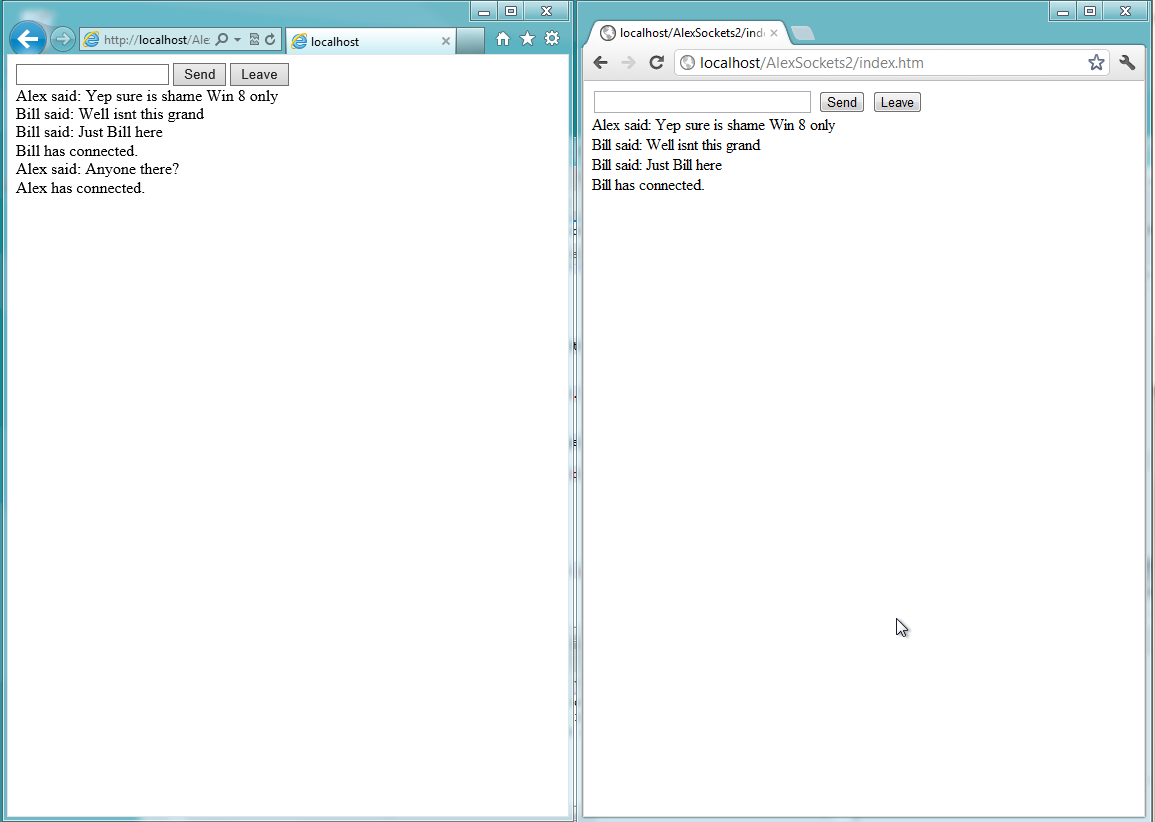
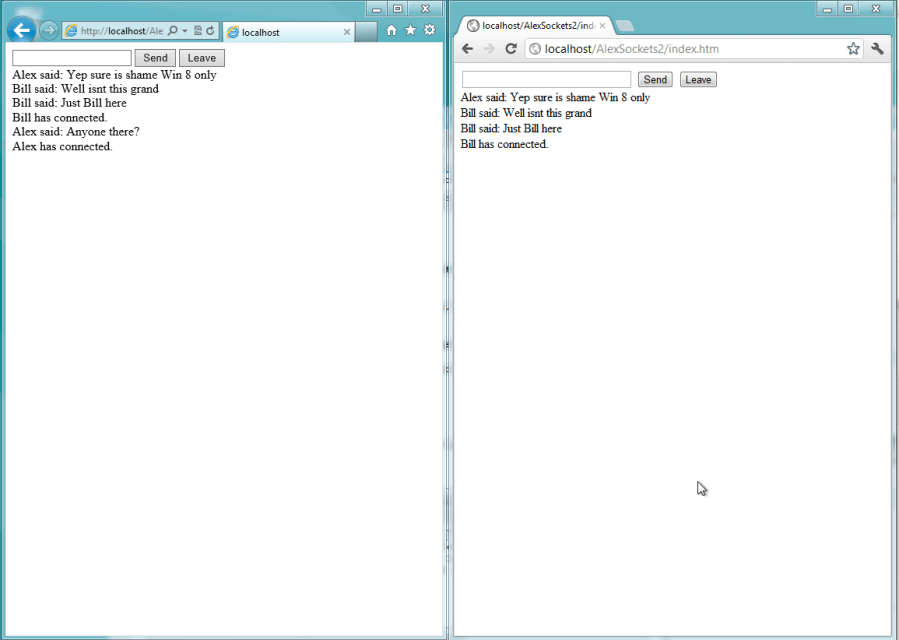
Now open up a different browser and you should find you can via websockets!
Microsoft Silverlight 5 and Windows Azure Enterprise Integration and Visual Studio 11 First Look Cookbook

A lot of people seem to be writing/have written books at the moment, my self included.

The first book I want to mention is David Burela’s book Microsoft Silverlight 5 and Windows Azure Enterprise Integration that is available now (more info at  http://www.packtpub.com/microsoft-silverlight-5-enterprise-integration-on-windows-azure/book).

Disclaimer – I know David as a friend & assisted with the technical review of this book so am somewhat biased!

This book will take you from Azure basics to using advanced features such as caching and load balancing. The book tries to simulate real world problems you will experience and the reader works through a number of simulated examples .

Having had the opportunity to work on a number of Azure projects the last few years it was great to be able to give input to this book’s best practice section and how to avoid various Azure pitfalls (and there are many!). Readers shouldn’t be put off by the Silverlight bit in the title- if you are working with Azure much of the advice will still be relevant.

The second book I want to mention is the upcoming Microsoft Visual Studio 11 First Look Cookbook by Richard Banks. This one isn’t quite ready yet and I haven’t read it but if Richard’s writing is as good as some of his presentations, podcast (http://www.talkingshopdownunder.com/) and blog articles it’s going to be a great read.

Technically I guess there is a slight overlap here with my own book Introducing .net 4.5 although Richards seems to be more focussed on a step by step guide for specific issues rather than a broad overview.  Richards also does have a slightly better cover than Apress’s stockstandard black and yellow!

I say buy both – but probably mine if you only buy one 😉

Tables are bad – or are they?

This week I was putting together some general web development guidelines for our team (ill publish these at some point when they are a bit more mature – we based some of them on these great css guidelines.

We are developing a new version of an existing site and one of the items that came up was the use of tables in html for layout.

One of my colleagues forwarded me a link about why tables for layout are bad (http://www.hotdesign.com/seybold/index.html). It’s a bit dated but most of the advice is still relevant.

Unfortunately what most developers have heard (and took from that article judging by the emails I received) was that tables are universally bad.

Of course this isn’t the case and few things are universally bad (apart from maybe the marquee tag and Microsoft SharePoint).

Tables are entirely appropriate for tabular data.

In fact lets go to the source and refer to the HTML5 spec – crazy eh? and see what it says about the table element

“The table element represents data with more than one dimension, in the form of a table”

And it goes on to say:

“Tables should not be used as layout aids”

The spec even goes into great detail about how to add further information to your tables (and when not to).

The reason tables are bad when used for layout are:

  • CSS is a better and more flexible way to lay out a webpage
  • Tables result in verbose html resulting in bigger slower loading pages
  • Tables are arguably harder to maintain consistent layout
  • Tables probably lock you into a particular layout
  • Accessibility issues – screen readers dont cope so well with tables
  • Can prevent incremental rendering and encourage reflow
  • You are abusing the elements purpose and they can encourage layout mark-up on the page itself
  • It can be tricky to get tables looking right across all browsers
  • SEO – I am not sure how much of an issue this is but we will go with it for now..

Some examples of where tables might be appropriate:

  • Comparison grids
  • Lists of results*
  • Agendas

So if you have some tabular data like then go ahead and use a table.

One  of my colleague’s pointed out all some big sites such as Google & Amazon using Tables to lay out the page. I suspect the Google example was to do with avoiding the need for an additional request but its also important to note that these sites have pretty simple designs and you’d quickly get into a mess with something more complex.

In conclusion:

  • Tables bad for layout
  • Tables are appropriate for tabular data

*Interestingly if you take a look at most large sites search results e.g. Amazon, Expedia you will find the results laid out using a divs rather than tables. I think it’s probably the way I would go too as I suspect it would be easier to style, maintain and less verbose.

Further reading:

http://stackoverflow.com/questions/83073/why-not-use-tables-for-layout-in-html

Mobile development tips talk (mobile madness) slides and code online

The slides and code from my Mobile Madness talk are online at:

https://skydrive.live.com/?cid=6cc4124890b9458b&sc=documents&link=1&groupUpsell=0&id=6CC4124890B9458B%21151#cid=6CC4124890B9458B&id=6CC4124890B9458B%21260&sc=documents

Talk summary below:

Mobile optimized sites grow in importance with many analysts predicting that mobile visitors will soon exceed desktop users:

“We believe that it’s very likely that mobile devices could become the preferred method of accessing the Internet in the future. Morgan Stanley predicts that by 2014 access from mobile devices will exceed that of the desktop” (http://www.morganstanley.com/institutional/techresearch/pdfs/Internet_Trends_041210.pdf).

Come to this session to learn about techniques for developing mobile optimized sites, frameworks such as jQuery mobile and my own experience (and mistakes!).

How to Emigrate to Australia

I have had a number of people email me in recent months asking about how to go about migrating to Australia so thought I would condense all the information into a blog post to save me from writing the same material time and time again.

This information is mainly aimed at those in the UK/Europe but most will be applicable to other nationalities as well.

My migration story started like all the best stories with a very bad woman and I have been living in Melbourne for just over two and a half years..

So why move at all?

Well Australia has a great life style that I personally prefer. There are a lot of job opportunities (check out seek.com.au), the pay rates are currently much higher than they are in Europe (particularly with current exchange rate). At the time of writing a Microsoft .net developer can expect to earn around $60,000-$120,000 depending on number of years of experience. Career One have a salary calculator that will give you a good idea of how much money you actually end up with after tax. Obviously pay rates are higher for those in leadership positions/banking etc.

Housing is generally cheaper and much larger here (check out RealEstate.com.au), petrol is half the price and every day I think what a beautiful country this is when I see palm trees and parrots on my morning runs (the novelty of this hasn’t gone yet for me..).

Some things are also much more expensive e.g. cars (almost double particularly European brands!) and books (I buy from Amazon). Broadband infrastructure sucks & some services such as banking are very much backward compared to Europe. Services, new products (particularly online stuff) tends to be introduced here last. Additionally going out the main cities can feel like a step back in time (and not always in a good way).

Migration is not for everyone and if you are the sort of person that doesn’t like the following its probably not for you:

  • Change – yes Australians speak english but things are done differently, they speak differently, there are different products tv etc
  • Bluntness (Australians do send to tell it as it is and you will often hear suck it up, take a concrete pill or maybe that’s just me..)
  • Very close to their family (Australia is a looooong way from Europe and the time difference doesn’t help).

If all this still sounds good and you want to migrate then you have the following main options:

Working Holiday

I am not going to say too much about the working holiday visa apart from its quick & cheap to apply for but it is going to restrict the type of places that will employ you. My sister used this option and spent around 6 months working on a number of short term carer contracts. It is a great way to travel & explore Australia.

Skilled Migration Visa

The option I chose was the skilled migration visa. This is the least restrictive but also the most time consuming and expensive. To apply for this you need a skill that is in demand (check out http://www.immi.gov.au/skilled/sol/). In total I think this cost me around 2500 pounds sterling (about two and a half years ago) and took about 10 months to process.

You will go through an assessment process where a point’s score is calculated based on skill, years of experience, education and english fluency. You will then need criminal background and medical checks. I am a software developer so the Australian Computer Society assessed my CV, degree & a few Microsoft qualifications – this took around 6-8 weeks. It is best to find a doctor familiar with the migration requirements (try a travel clinic I found one near Heathrow).

There are a number of companies offering visa application services. You really don’t need to use any of these unless you have some special circumstances. The application process is fairly straight forward (hey I managed it) and just involves following instructions  -and filling in some 45 page forms..

The process is basically:

  • Fill in some lengthy forms
  • Get your skills assessed by relevant industry body
  • Police check
  • Medical Check (doctor exam, blood tests & chest x-ray)
  • Visa granted
  • Activate visa
  • Go to Oz 🙂

Once you have obtained the visa you then need to “activate” it by travelling to Australia before the initial entry date (I think this is 2 years from when the visa is granted). Once its activated you are free to use it for next 5 years but its apparently important to be in Australia at least 2 of these 5 years to stand a good chance of resident return stamp.

This visa entitles you to do pretty much everything an Aussie can do apart from an Australian passport and the right to vote (its mandatory here). You can stay indefinitely (although do need to obtain a resident return stamp if leave after 5 years). You cannot become a citizen until you have held this visa for at least 4 years (at one point this was 2 grrrr).

Your other main option is to get a company to sponsor you. This is probably pretty hard unless you have some specialist skills or are part of a global corp. If you are a Microsoft developer/consultant my employer Readify are always looking for people, provide 20 days paid personal development (I have been on Udi Dahan’s architecture course, Teched, Remix and a number of smaller workshops), have some great people to learn from and will sponsor visa’s so check us out at http://readify.net/work-with-us.

Employer Sponsored

The main issue with Employer sponsored visas are that it restricts your options in that you are tied to an individual employer. However they are much cheaper (companies will generally cover the costs) and can be obtained in as little as a month depending on your circumstances. You also have the option to apply for permanent residency visa after this is obtained (not sure how long for this).

It’s worth noting that until I was in Australia I didn’t get a single reply to job applications and the minute I had an Australian mobile number I had heaps of calls. It took me two and a half weeks to find my first job so don’t be disheartened if you don’t get any replies until you are here. I would advise having enough money to cover 3 months without work. It took me about 2 and a half weeks to find a job.

When I first moved I stayed in a hotel for two nights then a short term rental for 6 weeks. This was much cheaper than hotel but not as cheap as renting. You are however going to find it hard to find a rental without a job and the rental market can be quite competitive in cities.

For IT workers you are probably really looking at going to Sydney, Melbourne, Brisbane or Perth. That’s not to say that other cities wont have jobs just there are more jobs in the larger cities and why make it hard when you have just moved here. Personally I prefer Melbourne to Sydney and probably partly because the city has a more European feel to it. Sydney probably does have better beaches nearby through 🙂 I have only really spent a short holiday in Brisbane so cant comment apart from it seemed a nice city with lots nearby (probably smaller than Melbourne or Sydney). In my brief time in Perth I considered it is probably a bit quiet for a younger crowd but is a beautiful city and would be perfect for a young family.

A great forum for general emigration queries is the Expats Forum and they have a very good emigration checklist you should read.

Hope this helps and good luck with the process if you decide its for you 🙂

Web Deploy – Retrying the sync because a socket error (10054) occurred

I was recently setting up Web Deploy for a customer (there are quite a few steps to this) and when I tried to deploy the project to the remote server received the following error:

Warning               1              Retrying the sync because a socket error (10054) occurred.

Retrying operation ‘Serialization’ on object sitemanifest (sourcePath). Attempt 1 of 10.                 0              0                TestWebDeploy

This was the first time I have set this up on a remote machine so thought it must be some kind of firewall interference as it all seemed to work locally. Web Deploy requires port 8172 open by default but I could Telnet to this without issue so the problem was something else.

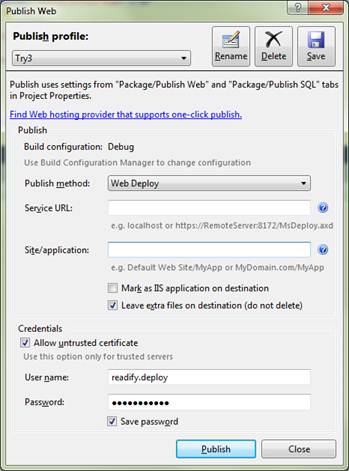
Take a look at the following screen for configuring web deploy – one of the items you have to specify is the service url of the web deploy end point:

Web Deploy Screen

Microsoft even give you some examples of service end point such as: https://RemoteServer:8172/MsDeploy.axd so that’s the format I used.

Well turns out you dont want that http or https prefix and if you add it you will get the error above.

The correct format is actually: 0.0.0.0:8172/MsDeploy.axd (obviously replace 0.0.0.0 with your actual IP address)

You might now need to check the allow untrusted certificate option as well.

Thank you Microsoft for wasting 2 hrs of my time on this.

If this doesnt fix your issue then maybe you have a certificate binding problem check out this stack overflow post.

Web Directions – What do you know – Navigation API talk

Enjoyed the Web Directions – What do you know event where I presented on the Navigation API. I love the idea of 5 min talks and it was all run very smoothly. Think we will try this at DDD this year. Think I need to practice slowing down for this format 🙂

My slides etc are at:
https://skydrive.live.com/?cid=6cc4124890b9458b&sc=documents&link=1&groupUpsell=0&id=6CC4124890B9458B%21151#cid=6CC4124890B9458B&id=6CC4124890B9458B%21257&sc=documents

Node.js er what’s it supposed to be used for?

<Disclaimer I am new to Node.js so this represents my current thoughts and additionally much of my development is on a Microsoft platform so I come from this perspective>

There is a lot of fuss in the web development community at the moment about Node.js and how it’s going to be the next big thing.

Node.js provides an environment to run JavaScript in and has been used successfully on a number of high traffic sites such as LinkedIn so I decided to investigate further. Now I really like JavaScript (although it has both the irritation and bonus that I discover something new about it every week) so I was keen to look into this technology and what I could potentially use it for.

The main arguments I have heard for using Node are:

  • It’s great for service type stuff as it’s more scalable because of its eventing model, no locks etc
  • A JavaScript runtime environment outside the web browser

Superior Scalability

One of the biggest claims you will hear from Node advocates is its superior scalability due to its use of call-backs (async) and no locking. The jury seems to be out on whether Node applications do actually scale better than other alternatives and there are countless blog posts arguing both ways. I don’t know enough about the low level detail to argue either way but let’s assume it’s pretty quick for certain scenarios (basically anything that’s IO bound is a potential candidate).

It’s important to also note that you can develop a similar scalable async model with .net although it certainly wasn’t as easy or intuitive as Node.js (especially without C#5’s Async features).

One thing I will say however in that my consultancy experience it is rarely the technology that is at fault when it comes to performance and let’s face it most of us don’t need our applications to be as scalable as something like LinkedIn or Facebook. More often than not performance issues are due to many calls being made to a database (usually multiple times) and the returning unnecessary data so I am not convinced as to this being a good enough reason to try out Node.

A way to run JavaScript outside the web browser

Node.js is pretty cool for playing around with JavaScript providing an environment for running your JavaScript applications and even a RPL interface. I came across an example of this last week when playing with the excellent CSSLint that used Node.js to tell me all the stuff I had screwed up when writing my CSS.

I was however left with the question of why I would actually want to write an application in JavaScript as there are so many existing (and easier?) ways of writing applications. If I want to knock off a quick prog to automate a tedious task or do something similar to CSSLint I am probably going to do it in C# with a mature set of well documented & maintained APIs and Visual Studio’s nice debugging environment. Of course JavaScript’s functional qualities make it very elegant for certain tasks and I can see there might be developers who only know JavaScript who now have another platform to develop on.

The issue however is that the very experienced JavaScript developers tend to have gained this experience from front end work so may not be the sort of people you want developing your services. But I guess its pretty cool that it opens up another option for JavaScript developers.

The second issue that bothered me was due to Node’s immaturity – would it have many libraries for tasks such as querying a database? Well I need not have worried as Node.js has a large community and a number of extensions (node packages) have been developed for performing common tasks so this shouldn’t be that much of an issue. I’m not sure I would trust a community developed interface to a product such as SQL Server to be as mature & up to date as Microsoft’s versions through.

Below are the main advantages I can see Node.js offers

Advantages:

  • Potentially more scalable for certain tasks
  • Developing certain types of services could be more intuitive
  • Node.js servuces are light weight and easy to modify
  • Anything has to be better than WCF (sorry Himanshu but WCF was written by the devil)
  • JavaScript is becoming a universal language & you can potentially run your code on multiple platforms
  • IISNode makes Node.js very easy to setup on Microsoft platform and benefit from IIS features such as logging, connections etc
  • Large number of packages/extensions available
  • Node.js apps can be hosted very cheaply compared to an MS based app e.g. Heroku
  • For the MS devs Node.js can be hosted on Azure (although its apparently a bit of a pain)
  • Could help progress JavaScripts development and standards e.g. common.js

Disadvantages:

  • How many apps actually need Nodes much touted scalability?
  • When used for Service development the devs that are experienced in writing service type code probably aren’t also those experienced in JavaScript (not always of course!)
  • How can a wrapper for something like SQL server be more efficient and feature rich than Microsofts implementations so any perf gains may be negated by usage of poor performing extensions
  • Packages may not be maintained aren’t as mature as traditional vendor options
  • Poor debugging experience (I understand there is a debugger browser extension available)
  • Immature technology – potential bugs and lack of devs skilled in this area
  • Can same “perf/scalability gains” be experienced with existing async functionality?

I’d love to have a really good solid reason to use Node.js but having spoken to a number of colleagues no one is yet to give me one.

Sure its cool but I am left with the question what are you actually going to use it for? Er..

I remain open minded and I’d love for someone to give me a good answer to this question 🙂

Setting up Node on Windows

There is a lot of fuss at the moment in the web development community about a framework called Node.js that allows you to run JavaScript server side. A number of claims about fantastic scalability and lack of locking have been made regarding Node – whether these are actually true and if the advantages outweigh the disadvantages is another question..

Let’s assume however you are a Windows user who wants to see what all the fuss is about and get up and running with Node.js..

Previously getting Node.js running on Windows was a little painful and involved some manual compilation, patching of libaries and an application called Cygwin that emulated a *nix environment.

But no more! getting Node.js running on Windows is now very easy and it can be hosted within IIS by installing IISNode. This is actually pretty important as allows you to take advantage of a number of IIS features thus answering the question of how Node should be managed/hosted on a Windows machine. It’s worth noting as well that Node.js is even supported on Windows Azure.

Below are instructions on how to install Node.js on Windows:

First you are going to need a Windows OS that is at least as new as Vista with the IIS URL Rewriter module installed (add/remove programs).

If this is all good then go download & install Node.js from http://nodejs.org/. At the time of writing the most recent version is held at: http://nodejs.org/dist/v0.6.10/node-v0.6.10.ms.

Next you want to get hold of IIS Node by going to https://github.com/tjanczuk/iisnode.

IIS node has its own installer at (src/setup/iisnode-msi/) run the installer. Once you have run the IIS node installer if you look under the Modules section in IIS you will see a new module has been created:

New Node module in IIS

The next step is to create a directory for your node application (note you can also incorporate a node endpoint into an existing application by adding an entry to web.config but let’s keep it simple).

Create a site or application to map through to this directory in IIS (to create an application right click on default website and select Add Application). I am calling my virtual directory AlexNode.

Now create 2 files within your directory:

  • test.js
  • web.config

Open test.js up in a text editor and enter the following hello world node code (this is from the IISNode example):

var http = require(‘http’);

http.createServer(function (req, res) {
res.writeHead(200, {‘Content-Type’: ‘text/html’});
res.end(‘Hello, world! [helloworld sample; iisnode version is ‘
+ process.env.IISNODE_VERSION + ‘, node version is ‘ + process.version + ‘]’);
}).listen(process.env.PORT);

In web.config enter the following to tell ASP.net to use the Node module we have just installed:

<configuration>
<system.webServer>

<handlers>
<add name=”iisnode” path=”test.js” verb=”*” modules=”iisnode” />
</handlers>

</system.webServer>
</configuration>

That’s it you should now be able to view the node server running on your site by going to an address similar to the following:

http://localhost/alexNode/test.js

My site displays the following text:

Hello, world! [helloworld sample; iisnode version is 0.1.14, node version is v0.6.9]

That’s the set-up basics – there are heaps of extension libraries for Node that you should check out at http://search.npmjs.org/ and IISNode contains several samples that can be installed by going to: %programfiles%\iisnode\setupsamples.bat

Next why would you actually want to do this? 🙂