For my turn based strategy game I envisaged players moving pieces over a map that would look similar to the Game of thrones intro. Unfortunately this would require awesome 3D modelling & graphics skills that are a little beyond what I currently possess but its something to aim for!
I tried a few different ways to generate a map for my game. Initially I tried using a couple of array’s to define where to create ground and the height the ground should be.
height: [
0, 0, 4, 1, 0, 0, 0, 0, 0, 0,
0, 0, 4, 1, 0, 0, 0, 0, 0, 0
],

groundType: [
0, 0, 1, 1, 0, 0, 0, 0, 0, 0,
0, 0, 1, 1, 0, 0, 0, 0, 0, 0
]
I then iterated through the arrays creating blocks dependent on the height & ground type. You need to do this backwards otherwise you get the inverse map relative to the array declaration:
var y = WorldData.initParams.startY,
colPosition = WorldData.initParams.rowSize,
rowPosition = 1;

for (var i = WorldData.initParams.groundType.length - 1; i > -1; i--) {

if (WorldData.initParams.groundType[i] > 0) {

addBlock({
arrayIndex: i,
colPosition: colPosition,
rowPosition: rowPosition,
y: y,
blockHeight: WorldData.initParams.height[i] * WorldData.initParams.blockHeight
});
}

colPosition--;

//end of row
if (colPosition === 0) {
colPosition = WorldData.initParams.rowSize;
rowPosition++;
}
}
As I create each square of ground I assigned meta data to it to easily identify its location in the environment and type of terrain.
Below is a screenshot of a typical result (the white & red cubes represent creatures):
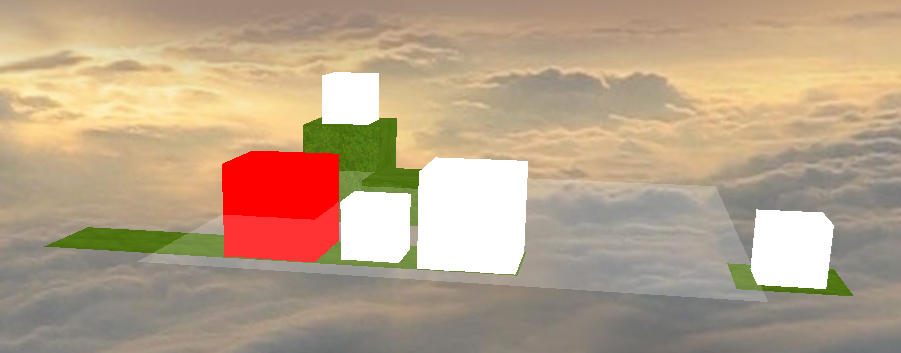
Although I think this would work OK and allow me to manipulate the environment very easily (e.g. destroy a block of ground) it seemed very inefficient having a lot of cubes for a flat area of ground with surfaces that are never viewed. It also looked a bit Minecraft esq & not in such a good way so I started looking at other options!
Height and texture maps
I came across a cool post by Bjorn Sandvik who utilized realworld GIS data & three.js to produce a height and textured map of parts of Norway. Bjorn did a lot of work manipulating real world data to produce a detailed texture & height map. This produced an awesome result but I don’t need something quite so complex.
At a high level my plan for creating terrain is:
- Create a bitmap to represent the games map (this has the added advantage that I dont need to create a level editor)
- Iterate through the bitmap’s pixels and assign a height value for each color (e.g. grey might represent mountains which are higher than trees)
- Output a JavaScript array of this data
- Use the array three.js to manipulate a plane’s vertexes to produce a height effect
Here is my very simple game bitmap enlarged (the original is 20 x 20 pixels):

I wrote a small C# program to iterate through the bitmap generate a JavaScript array string (note this is a slow way to do this and there is a faster way using LockBits method):
private string ParseBitmap(Bitmap bmp)
        {
            var sbHeightMap = new StringBuilder();

                for (var y = 0; y < bmp.Height; y++)
                {
                    for (var x = 0; x < bmp.Width; x++)
                    {
                        var clr = bmp.GetPixel(x, y);
                        var height = GetHeight(clr);
                        sbHeightMap.Append("," + height);
                    }
            }

            sbHeightMap.Remove(0, 1);

            return "[" + sbHeightMap + "]";
        }
I can then take the generated array and use it to manipulate a plane and then map the terrain image on top of it:
function loadNewTerrain() {

var geometry = new THREE.PlaneGeometry(WorldData.boardScreenWidth, WorldData.boardScreenWidth, WorldData.boardCells - 1, WorldData.boardCells - 1);

for (var i = 0, l = geometry.vertices.length-2; i++) {
geometry.vertices[i].z = WorldData.heightData[i];
}

var plane = new THREE.Mesh(geometry, WorldData.terrainTexture);

plane.material.side = THREE.DoubleSide;
plane.rotation.x = GameMath.de2ra(-90);
Game.newTerrain = plane;

Game.addObjectToScene(plane, 'ground');
}
This simple approach gives quite a pleasing affect with even a very simple image:

I tried this approach with a more complex 800×800 satellite photograph. The color to height mappings are not setup but it still produced a reasonable effect that shows the promise of this technique with a more detailed texture:

One issue this experiment brought up is how quickly game assets can get quite large – for example the height map of the above image is nearly 2mb and that I will need a good way of loading them hmm…

 simpleisbest.co.uk